# Fragula 2
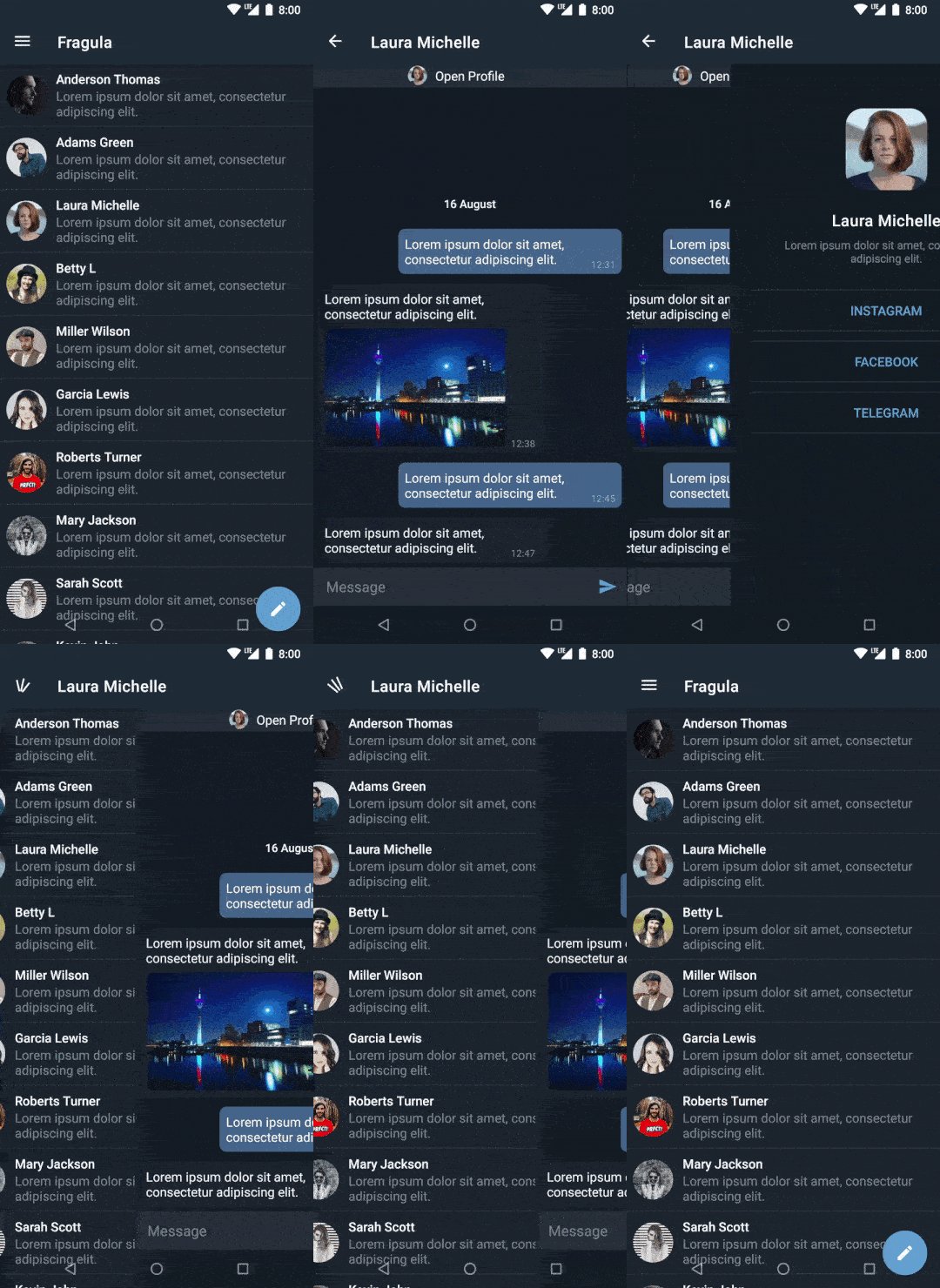
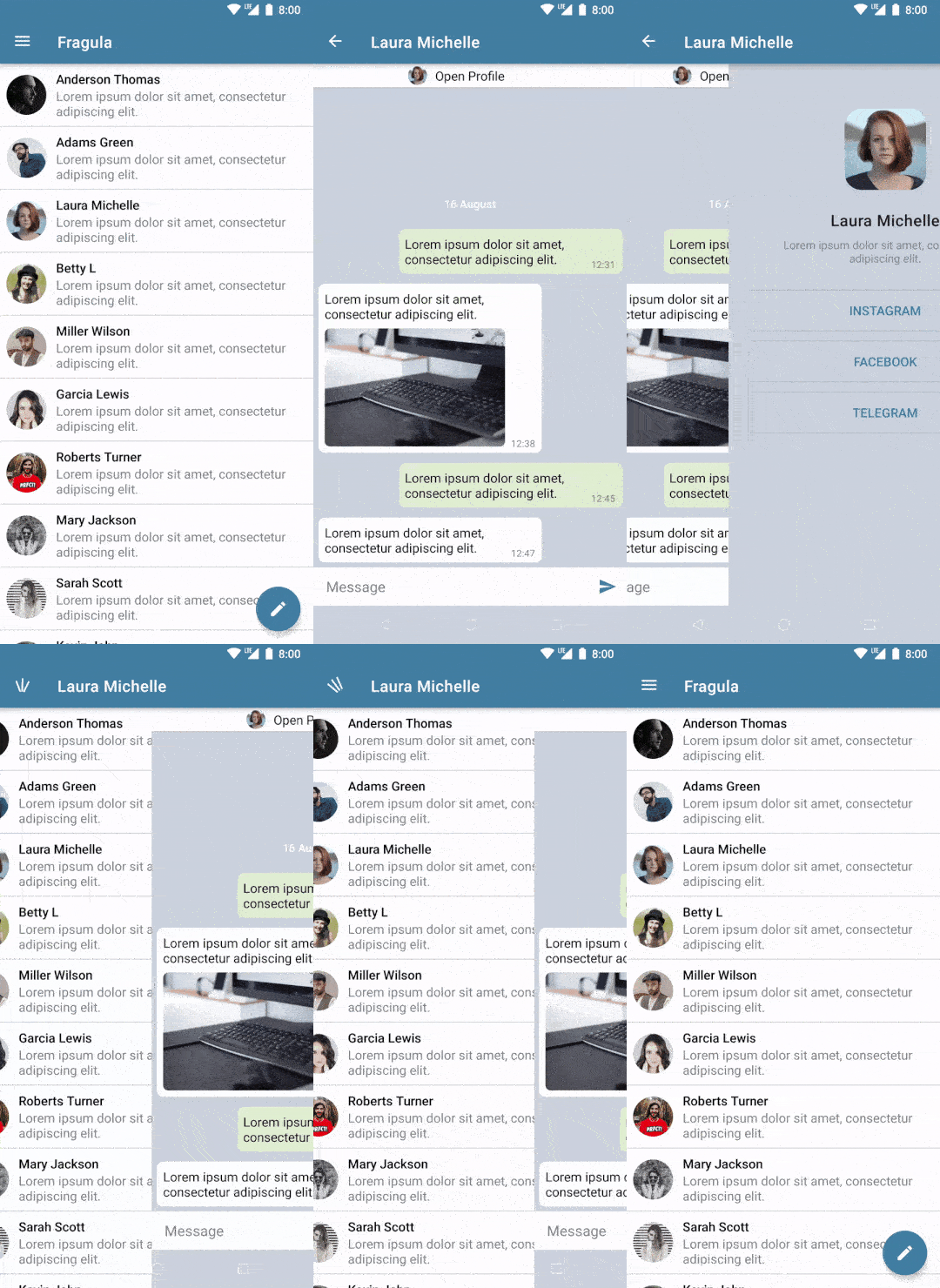
**Fragula** is a swipe-to-dismiss extension for [navigation component](https://developer.android.com/guide/navigation/navigation-getting-started) library for Android.
It is an adaptation of an earlier version created by **@shikleev** and now maintained in this repository.
 [](https://opensource.org/licenses/Apache-2.0) [](https://android-arsenal.com/details/1/8405)
| Dark Theme | Light Theme |
|:-----------------------------------------------------------------------------------------------------------------------------------:|:-----------------------------------------------------------------------------------------------------------------------------------------:|
|  |
|  |
---
# Table of Contents
## Fragments
1. [Gradle Dependency](#gradle-dependency)
2. [The Basics](#the-basics)
3. [More Options](#more-options)
1. [Navigate with arguments](#navigate-with-arguments)
2. [Multiple BackStacks](#multiple-backstacks)
4. [Swipe Direction](#swipe-direction)
5. [Swipe Transitions](#swipe-transitions)
6. [Theming](#theming)
## Jetpack Compose
1. [Gradle Dependency](#gradle-dependency-1)
2. [The Basics](#the-basics-1)
3. [More Options](#more-options-1)
1. [Navigate with arguments](#navigate-with-arguments-1)
2. [Multiple BackStacks](#multiple-backstacks)
4. [Customization](#customization)
---
# Fragments
The `fragula-core` module provides everything you need to get started with the library.
It contains all core and normal-use functionality.
[](https://repo1.maven.org/maven2/com/fragula2/fragula-core/)
|
---
# Table of Contents
## Fragments
1. [Gradle Dependency](#gradle-dependency)
2. [The Basics](#the-basics)
3. [More Options](#more-options)
1. [Navigate with arguments](#navigate-with-arguments)
2. [Multiple BackStacks](#multiple-backstacks)
4. [Swipe Direction](#swipe-direction)
5. [Swipe Transitions](#swipe-transitions)
6. [Theming](#theming)
## Jetpack Compose
1. [Gradle Dependency](#gradle-dependency-1)
2. [The Basics](#the-basics-1)
3. [More Options](#more-options-1)
1. [Navigate with arguments](#navigate-with-arguments-1)
2. [Multiple BackStacks](#multiple-backstacks)
4. [Customization](#customization)
---
# Fragments
The `fragula-core` module provides everything you need to get started with the library.
It contains all core and normal-use functionality.
[](https://repo1.maven.org/maven2/com/fragula2/fragula-core/)
 ## Gradle Dependency
Add this to your module’s `build.gradle` file:
```gradle
dependencies {
...
implementation 'com.fragula2:fragula-core:2.4.1'
}
```
The `fragula-core` module **does not** provide support for jetpack compose, you need to add the
`fragula-compose` dependency in your project.
---
## The Basics
**First,** you need to replace `NavHostFragment` with `FragulaNavHostFragment` in your layout:
```xml
```
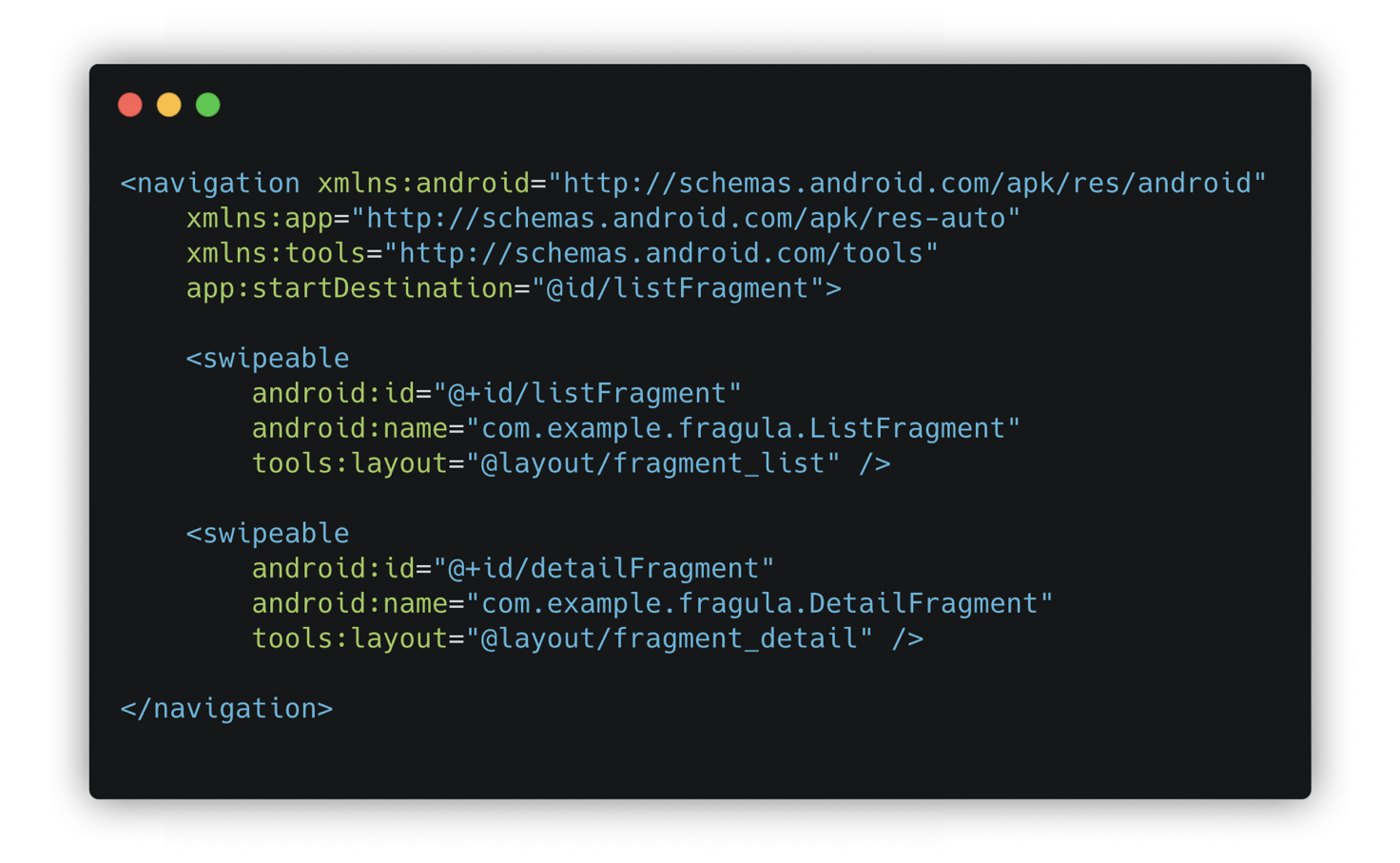
**Second,** you need to replace your `` destinations in graph with `` as shown below:
```xml
...
```
**Finally**, you need to set opaque background to your fragment’s root layout
to avoid any issues with swipe animation.
```xml
...
```
That's it! No need to worry about gestures, animations and switching the navigation framework
you already use in your project.
---
## More Options
### Navigate with arguments
In general, you should work with Fragula as if you would work with normal fragments. You should
strongly prefer passing only the minimal amount of data between destinations, as the total space
for all saved states is limited on Android.
**First**, add an argument to the destination:
```xml
```
**Second**, create a Bundle object and pass it to the destination using `navigate()` as shown below:
```kotlin
val bundle = bundleOf("itemId" to "123")
findNavController().navigate(R.id.detailFragment, bundle)
```
**Finally**, in your receiving destination’s code, use the `getArguments()` method to retrieve the
Bundle and use its contents:
```kotlin
val textView = view.findViewById(R.id.textViewItemId)
textView.text = arguments?.getString("itemId")
```
It's strongly recommended to use [Safe Args](https://developer.android.com/jetpack/androidx/releases/navigation#safe_args)
plugin for navigating and passing data, because it ensures type-safety.
### Multiple BackStacks
Currently multiple backstacks is **not supported**, which means you can’t safely use extensions such
as `setupWithNavController(...)` without losing your current backstack.
This issue affects both `BottomNavigationView` and `NavigationView` widgets.
---
## Swipe Direction
If you want to change the direction of swipe gesture, you can do that by setting
`app:swipeDirection="..."` manually in your navigation container. This example below sets up
vertical swipe direction.
```xml
```
You can use either `left_to_right` (default) or `right_to_left` for horizontal direction.
For vertical direction you can use only `top_to_bottom`, the `bottom_to_top` is not supported due
to internal ViewPager2 restrictions.
> **Note**
> If you having an issues with nested scrollable views, this appears to be a
[scroll issue](https://developer.android.com/training/animation/vp2-migration#nested-scrollables)
in ViewPager2. Please follow Google’s example to solve this.
---
## Swipe Transitions
You may want to know when the scrolling offset changes to make smooth transitions inside your
fragment view. To start listening scroll events you need to retrieve `SwipeController` and set
`OnSwipeListener` as shown below:
```kotlin
class DetailFragment : Fragment(R.layout.fragment_detail) {
private lateinit var swipeController: SwipeController
private lateinit var swipeListener: OnSwipeListener
override fun onViewCreated(view: View, savedInstanceState: Bundle?) {
super.onViewCreated(view, savedInstanceState)
// ...
swipeController = findSwipeController()
swipeListener = OnSwipeListener { position, positionOffset, positionOffsetPixels ->
// TODO animate views using `positionOffset` or `positionOffsetPixels`.
// the `position` points to the position of the fragment in backstack
}
swipeController.addOnSwipeListener(swipeListener)
}
override fun onDestroyView() {
super.onDestroyView()
swipeController.removeOnSwipeListener(swipeListener)
}
}
```
> **Note**
> Currently shared element transitions between destinations are not supported in any form.
> Remember that you must remove the listener when the fragment view is destroyed.
---
## Theming
In most of the cases there is no need to change any values, but if you wish to override these,
there are attributes provided:
```xml
```
---
# Jetpack Compose β
The `fragula-compose` module provides support for jetpack compose.
It may not contain all the features described earlier. If you want to make a feature request,
consider creating an issue on GitHub.
[](https://repo1.maven.org/maven2/com/fragula2/fragula-compose/)
## Gradle Dependency
Add this to your module’s `build.gradle` file:
```gradle
dependencies {
...
implementation 'com.fragula2:fragula-core:2.4.1'
}
```
The `fragula-core` module **does not** provide support for jetpack compose, you need to add the
`fragula-compose` dependency in your project.
---
## The Basics
**First,** you need to replace `NavHostFragment` with `FragulaNavHostFragment` in your layout:
```xml
```
**Second,** you need to replace your `` destinations in graph with `` as shown below:
```xml
...
```
**Finally**, you need to set opaque background to your fragment’s root layout
to avoid any issues with swipe animation.
```xml
...
```
That's it! No need to worry about gestures, animations and switching the navigation framework
you already use in your project.
---
## More Options
### Navigate with arguments
In general, you should work with Fragula as if you would work with normal fragments. You should
strongly prefer passing only the minimal amount of data between destinations, as the total space
for all saved states is limited on Android.
**First**, add an argument to the destination:
```xml
```
**Second**, create a Bundle object and pass it to the destination using `navigate()` as shown below:
```kotlin
val bundle = bundleOf("itemId" to "123")
findNavController().navigate(R.id.detailFragment, bundle)
```
**Finally**, in your receiving destination’s code, use the `getArguments()` method to retrieve the
Bundle and use its contents:
```kotlin
val textView = view.findViewById(R.id.textViewItemId)
textView.text = arguments?.getString("itemId")
```
It's strongly recommended to use [Safe Args](https://developer.android.com/jetpack/androidx/releases/navigation#safe_args)
plugin for navigating and passing data, because it ensures type-safety.
### Multiple BackStacks
Currently multiple backstacks is **not supported**, which means you can’t safely use extensions such
as `setupWithNavController(...)` without losing your current backstack.
This issue affects both `BottomNavigationView` and `NavigationView` widgets.
---
## Swipe Direction
If you want to change the direction of swipe gesture, you can do that by setting
`app:swipeDirection="..."` manually in your navigation container. This example below sets up
vertical swipe direction.
```xml
```
You can use either `left_to_right` (default) or `right_to_left` for horizontal direction.
For vertical direction you can use only `top_to_bottom`, the `bottom_to_top` is not supported due
to internal ViewPager2 restrictions.
> **Note**
> If you having an issues with nested scrollable views, this appears to be a
[scroll issue](https://developer.android.com/training/animation/vp2-migration#nested-scrollables)
in ViewPager2. Please follow Google’s example to solve this.
---
## Swipe Transitions
You may want to know when the scrolling offset changes to make smooth transitions inside your
fragment view. To start listening scroll events you need to retrieve `SwipeController` and set
`OnSwipeListener` as shown below:
```kotlin
class DetailFragment : Fragment(R.layout.fragment_detail) {
private lateinit var swipeController: SwipeController
private lateinit var swipeListener: OnSwipeListener
override fun onViewCreated(view: View, savedInstanceState: Bundle?) {
super.onViewCreated(view, savedInstanceState)
// ...
swipeController = findSwipeController()
swipeListener = OnSwipeListener { position, positionOffset, positionOffsetPixels ->
// TODO animate views using `positionOffset` or `positionOffsetPixels`.
// the `position` points to the position of the fragment in backstack
}
swipeController.addOnSwipeListener(swipeListener)
}
override fun onDestroyView() {
super.onDestroyView()
swipeController.removeOnSwipeListener(swipeListener)
}
}
```
> **Note**
> Currently shared element transitions between destinations are not supported in any form.
> Remember that you must remove the listener when the fragment view is destroyed.
---
## Theming
In most of the cases there is no need to change any values, but if you wish to override these,
there are attributes provided:
```xml
```
---
# Jetpack Compose β
The `fragula-compose` module provides support for jetpack compose.
It may not contain all the features described earlier. If you want to make a feature request,
consider creating an issue on GitHub.
[](https://repo1.maven.org/maven2/com/fragula2/fragula-compose/)
 ## Gradle Dependency
Add this to your module’s `build.gradle` file:
```gradle
dependencies {
...
implementation 'com.fragula2:fragula-compose:2.4.1'
}
```
The `fragula-compose` module **does not** provide support for fragments, you need to add the
`fragula-core` dependency in your project.
---
## The Basics
**First,** you need to replace `NavHost(...)` with `FragulaNavHost(...)` in your main composable:
```kotlin
// MainActivity.kt
setContent {
AppTheme {
Surface(
modifier = Modifier.fillMaxSize(),
color = MaterialTheme.colors.background,
) {
val navController = rememberNavController()
FragulaNavHost(navController, startDestination = "list") {
// ...
}
}
}
}
```
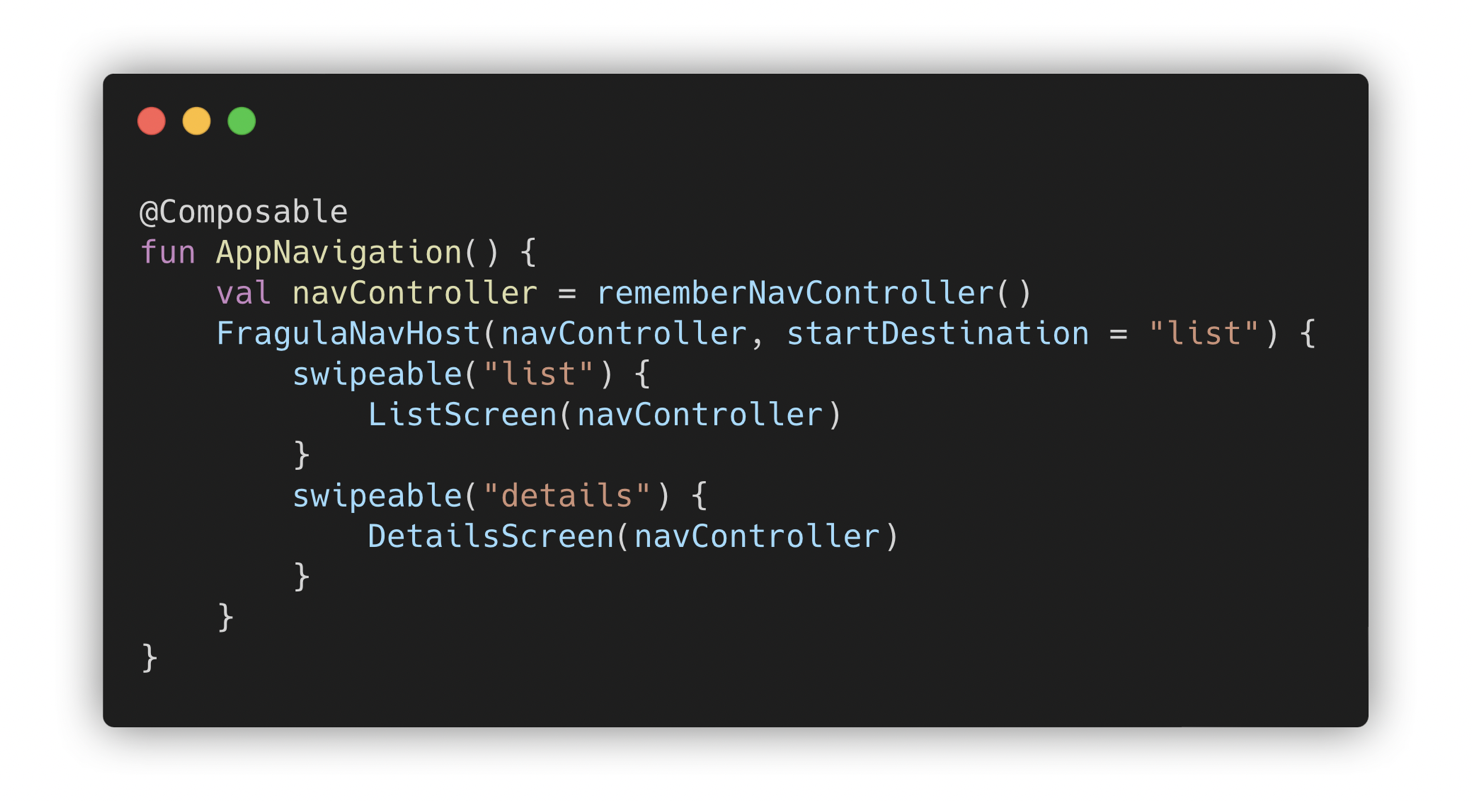
**Second,** you need to replace your `composable(...)` destinations with `swipeable(...)` as shown below:
```kotlin
val navController = rememberNavController()
FragulaNavHost(navController, startDestination = "list") {
swipeable("list") {
ListScreen(navController)
}
swipeable("details") {
DetailsScreen(navController)
}
}
```
**Finally**, you need to set opaque background to your composables to avoid any issues with swipe animation.
```kotlin
@Composable
fun DetailsScreen(navController: NavController) {
Box(modifier = Modifier.fillMaxSize()
.background(Color.White)
) {
// TODO content
}
}
```
---
## More Options
### Navigate with arguments
Fragula also supports passing arguments between composable destinations the same way as in the
androidx navigation library. Create a deeplink and specify the argument type, then you can extract
`NavArguments` from the `NavBackStackEntry` that is available in the lambda of the `swipeable()`
function.
```kotlin
NavHost(startDestination = "profile/{userId}") {
// ...
swipeable("profile/{userId}", arguments = listOf(
navArgument("userId") { type = NavType.StringType }
)) { backStackEntry ->
ProfileScreen(navController, backStackEntry.arguments?.getString("userId"))
}
}
```
To pass the argument to the destination, simply call `navController.navigate("profile/user1234")`.
For more information read the article [Navigating with Compose](https://developer.android.com/jetpack/compose/navigation)
on official android developers website.
### Multiple BackStacks
As already have been mentioned, Fragula **doesn't support** multiple backstacks both in XML and Compose.
If you really need this feature in your app, consider creating a nested `NavHost` for bottom tabs only.
---
## Customization
If you'd like to discover more customization features, here is parameters list.
```kotlin
@Composable
fun FragulaNavHost(
navController: NavHostController,
startDestination: String,
modifier: Modifier = Modifier,
route: String? = null,
dimColor: Color = DimColor, // Color used for the dimming
dimAmount: Float = 0.1f, // Percentage of dimming (depends on drag offset)
parallaxFactor: Float = 1.3f, // Parallax multiplier (depends on drag offset)
animDurationMs: Int = 500, // Duration of swipe animation
elevation: Dp = 3.dp, // Elevation applied on the composable
builder: NavGraphBuilder.() -> Unit
) {
// ...
}
```
## Gradle Dependency
Add this to your module’s `build.gradle` file:
```gradle
dependencies {
...
implementation 'com.fragula2:fragula-compose:2.4.1'
}
```
The `fragula-compose` module **does not** provide support for fragments, you need to add the
`fragula-core` dependency in your project.
---
## The Basics
**First,** you need to replace `NavHost(...)` with `FragulaNavHost(...)` in your main composable:
```kotlin
// MainActivity.kt
setContent {
AppTheme {
Surface(
modifier = Modifier.fillMaxSize(),
color = MaterialTheme.colors.background,
) {
val navController = rememberNavController()
FragulaNavHost(navController, startDestination = "list") {
// ...
}
}
}
}
```
**Second,** you need to replace your `composable(...)` destinations with `swipeable(...)` as shown below:
```kotlin
val navController = rememberNavController()
FragulaNavHost(navController, startDestination = "list") {
swipeable("list") {
ListScreen(navController)
}
swipeable("details") {
DetailsScreen(navController)
}
}
```
**Finally**, you need to set opaque background to your composables to avoid any issues with swipe animation.
```kotlin
@Composable
fun DetailsScreen(navController: NavController) {
Box(modifier = Modifier.fillMaxSize()
.background(Color.White)
) {
// TODO content
}
}
```
---
## More Options
### Navigate with arguments
Fragula also supports passing arguments between composable destinations the same way as in the
androidx navigation library. Create a deeplink and specify the argument type, then you can extract
`NavArguments` from the `NavBackStackEntry` that is available in the lambda of the `swipeable()`
function.
```kotlin
NavHost(startDestination = "profile/{userId}") {
// ...
swipeable("profile/{userId}", arguments = listOf(
navArgument("userId") { type = NavType.StringType }
)) { backStackEntry ->
ProfileScreen(navController, backStackEntry.arguments?.getString("userId"))
}
}
```
To pass the argument to the destination, simply call `navController.navigate("profile/user1234")`.
For more information read the article [Navigating with Compose](https://developer.android.com/jetpack/compose/navigation)
on official android developers website.
### Multiple BackStacks
As already have been mentioned, Fragula **doesn't support** multiple backstacks both in XML and Compose.
If you really need this feature in your app, consider creating a nested `NavHost` for bottom tabs only.
---
## Customization
If you'd like to discover more customization features, here is parameters list.
```kotlin
@Composable
fun FragulaNavHost(
navController: NavHostController,
startDestination: String,
modifier: Modifier = Modifier,
route: String? = null,
dimColor: Color = DimColor, // Color used for the dimming
dimAmount: Float = 0.1f, // Percentage of dimming (depends on drag offset)
parallaxFactor: Float = 1.3f, // Parallax multiplier (depends on drag offset)
animDurationMs: Int = 500, // Duration of swipe animation
elevation: Dp = 3.dp, // Elevation applied on the composable
builder: NavGraphBuilder.() -> Unit
) {
// ...
}
```