 |
|  |
|  |
### Modal bottom sheets
| Actor | Movie |
| :---: | :---: |
|
|
### Modal bottom sheets
| Actor | Movie |
| :---: | :---: |
|  |
|  |
### Movie details & Add to favorites
| Add to favorites | Favorites | Details |
| :--------------: | :-------: | :-----: |
|
|
### Movie details & Add to favorites
| Add to favorites | Favorites | Details |
| :--------------: | :-------: | :-----: |
|  |
|  |
|  |
### Voice search actors
| Search capabilities |
| :---: |
|
|
### Voice search actors
| Search capabilities |
| :---: |
|  |
*Inspired from*
| [JetCaster](https://github.com/android/compose-samples/tree/main/Jetcaster) | [JetNews](https://github.com/android/compose-samples/tree/main/JetNews) | [JetSnack](https://github.com/android/compose-samples/tree/main/Jetsnack) |
| :-: | :-: | :-: |
> [More compose content](https://developersbreach.com/compose/)
## :tokyo_tower: Architecture
> ### Follows new architecture guide updated on [**14 December 2021**](https://android-developers.googleblog.com/2021/12/rebuilding-our-guide-to-app-architecture.html) from revamped guide to app architecture.
#### :musical_keyboard: Layer of this app.
| Network | | Repository | | ViewModels | | Screens |
| :-: | :-: | :-: | :-: | :-: | :-: | :-: |
| `Data`
|
*Inspired from*
| [JetCaster](https://github.com/android/compose-samples/tree/main/Jetcaster) | [JetNews](https://github.com/android/compose-samples/tree/main/JetNews) | [JetSnack](https://github.com/android/compose-samples/tree/main/Jetsnack) |
| :-: | :-: | :-: |
> [More compose content](https://developersbreach.com/compose/)
## :tokyo_tower: Architecture
> ### Follows new architecture guide updated on [**14 December 2021**](https://android-developers.googleblog.com/2021/12/rebuilding-our-guide-to-app-architecture.html) from revamped guide to app architecture.
#### :musical_keyboard: Layer of this app.
| Network | | Repository | | ViewModels | | Screens |
| :-: | :-: | :-: | :-: | :-: | :-: | :-: |
| `Data` |
| | |
| **Search Screen**
|
| | |
| **Search Screen** |
| | |
| **Detail Screen**
|
| | |
| **Detail Screen** |
## :mag: Search Animation
```kotlin
// Simple progressive circle looking animation
val animateCircle = remember { Animatable(0f) }.apply {
AnimateShapeInfinitely(this)
}
@Composable
fun AnimateShapeInfinitely(
// shape which will be animated infinitely.
animateShape: Animatable
|
## :mag: Search Animation
```kotlin
// Simple progressive circle looking animation
val animateCircle = remember { Animatable(0f) }.apply {
AnimateShapeInfinitely(this)
}
@Composable
fun AnimateShapeInfinitely(
// shape which will be animated infinitely.
animateShape: Animatable Calling the function once will draw a circle, in my example I have drawn it thrice with differnt colors, radius and scales.
```kotlin
DrawCircleOnCanvas(
scale = scaleInfiniteTransition(targetValue = 2f, durationMillis = 600),
color = circleColor,
radiusRatio = 4f
)
```
I have kept all initial states of 3 circles to 0f to make end result much smoother.
Calling the function once will draw a circle, in my example I have drawn it thrice with differnt colors, radius and scales.
```kotlin
DrawCircleOnCanvas(
scale = scaleInfiniteTransition(targetValue = 2f, durationMillis = 600),
color = circleColor,
radiusRatio = 4f
)
```
I have kept all initial states of 3 circles to 0f to make end result much smoother.Random or uneven gaps between initial/target/durationMillis will make end animation look more abrupt and aggressively pushing it's bounds. ```kotlin @Composable private fun scaleInfiniteTransition( initialValue: Float = 0f, targetValue: Float, durationMillis: Int, ): Float { val infiniteTransition = rememberInfiniteTransition() val scale: Float by infiniteTransition.animateFloat( initialValue = initialValue, targetValue = targetValue, animationSpec = infiniteRepeatable( animation = tween(durationMillis, easing = LinearEasing), repeatMode = RepeatMode.Reverse ) ) return scale } ``` ```kotlin @Composable fun DrawCircleOnCanvas( scale: Float, color: Color, radiusRatio: Float ) { Canvas( modifier = Modifier .fillMaxSize() .graphicsLayer { scaleX = scale scaleY = scale } ) { val canvasWidth = size.width val canvasHeight = size.height drawCircle( color = color, center = Offset( x = canvasWidth / 2, y = canvasHeight / 2 ), radius = size.minDimension / radiusRatio, ) } } ``` ## :mobile_phone_off: Offline state | Dark | Light | | :--: | :---: | |
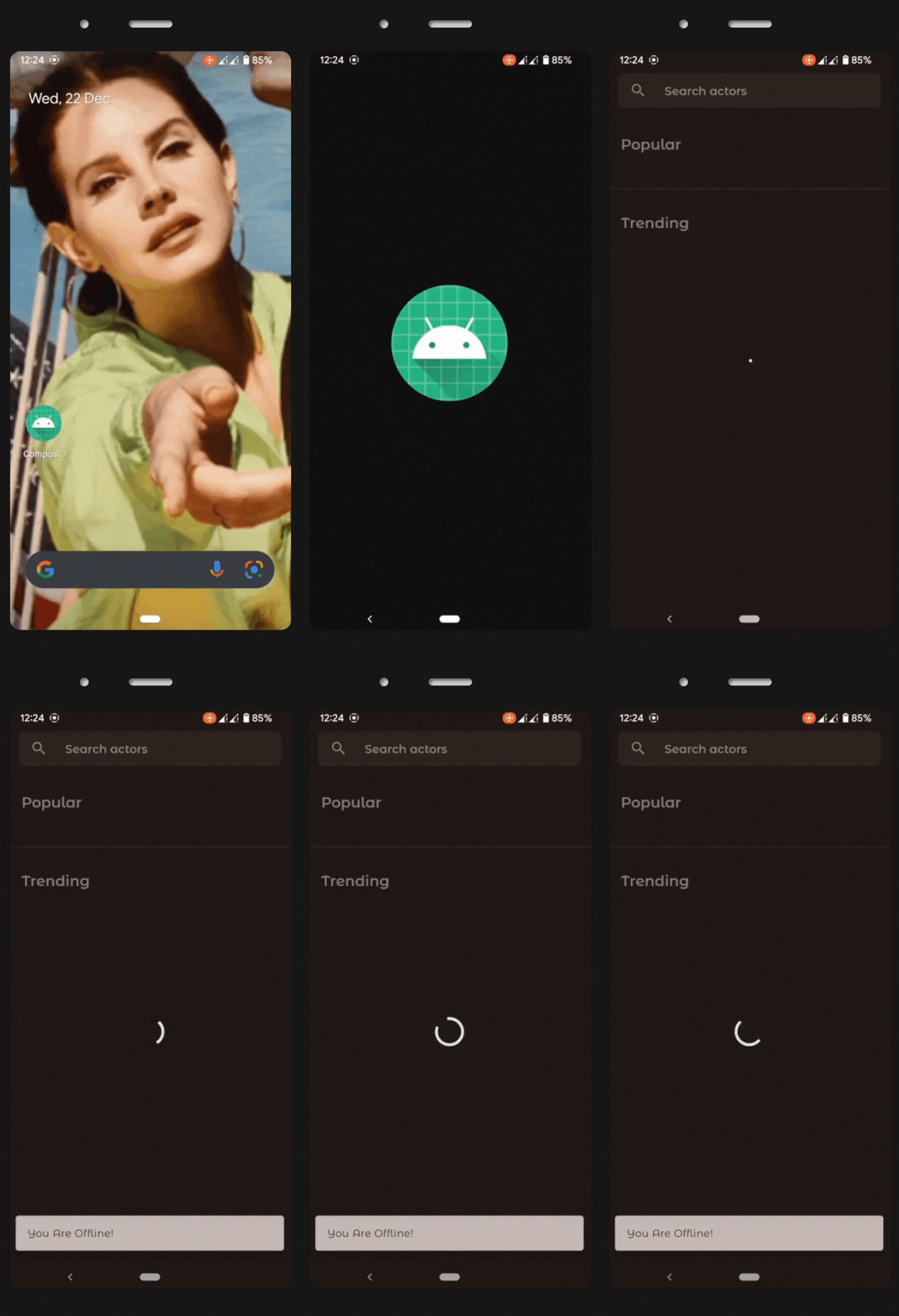 |
| 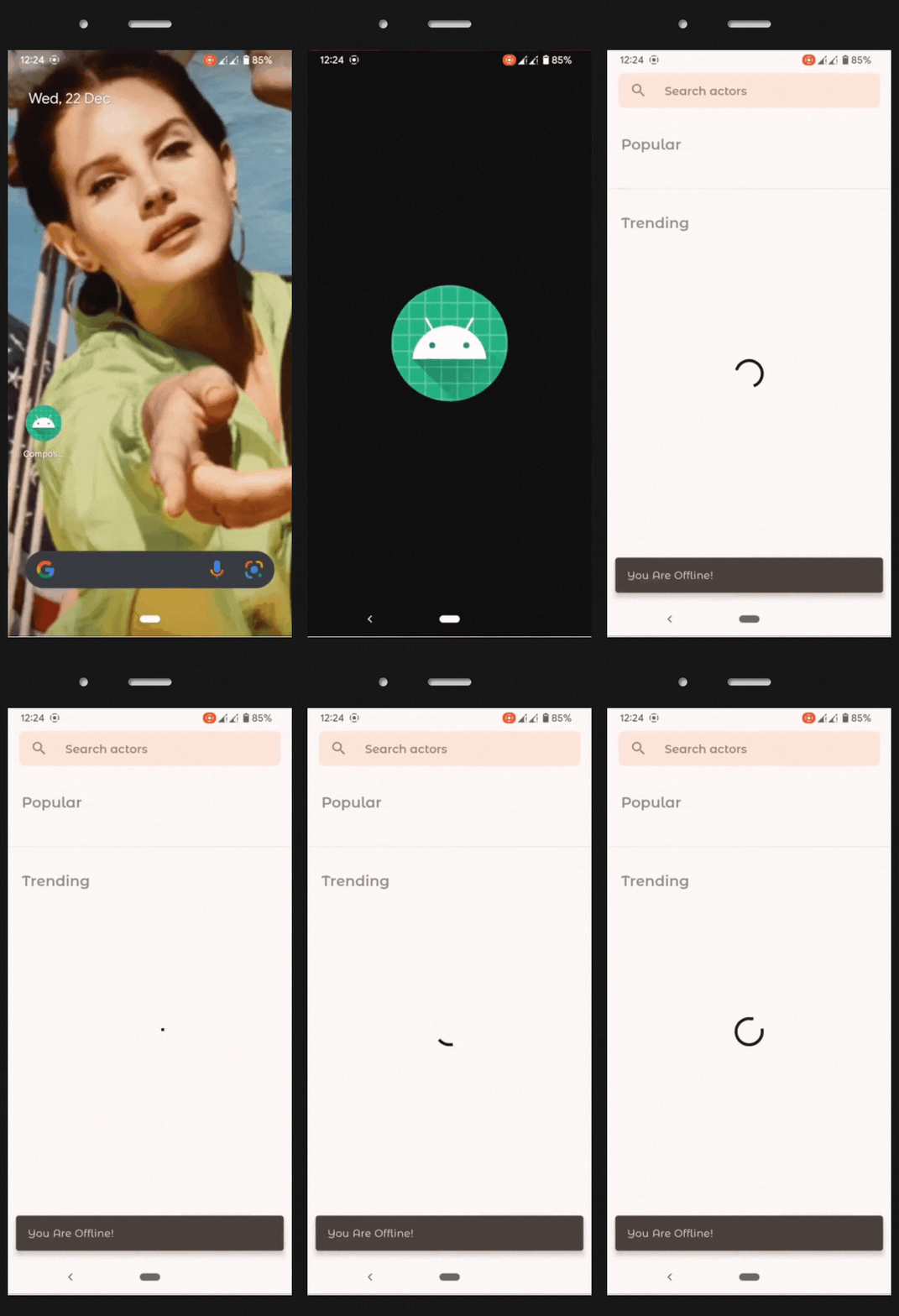 |
Show a Snackbar message with `SnackbarHostState`.
```kotlin
if (!isOnline) {
LaunchedEffect(scope) {
scope.launch {
scaffoldState.snackbarHostState.showSnackbar(
message = context.getString(R.string.offline_snackbar_message),
duration = SnackbarDuration.Indefinite
)
}
}
}
```
### ViewModels
All screens have their own ViewModels for managing the ui state.
```kotlin
class HomeViewModel(
application: Application,
private val repository: AppRepository
) : AndroidViewModel(application) {
// Holds the state for values in HomeViewState
var uiState by mutableStateOf(HomeViewState())
private set
init {
// Update the values in uiState from all data sources.
viewModelScope.launch {
uiState = HomeViewState(isFetchingActors = true)
val popularActorsList = repository.getPopularActorsData()
val trendingActorsList = repository.getTrendingActorsData()
uiState = HomeViewState(
popularActorList = popularActorsList,
trendingActorList = trendingActorsList,
isFetchingActors = false
)
}
}
}
```
Model for UI state of the screen.
```kotlin
data class HomeViewState(
var popularActorList: List
|
Show a Snackbar message with `SnackbarHostState`.
```kotlin
if (!isOnline) {
LaunchedEffect(scope) {
scope.launch {
scaffoldState.snackbarHostState.showSnackbar(
message = context.getString(R.string.offline_snackbar_message),
duration = SnackbarDuration.Indefinite
)
}
}
}
```
### ViewModels
All screens have their own ViewModels for managing the ui state.
```kotlin
class HomeViewModel(
application: Application,
private val repository: AppRepository
) : AndroidViewModel(application) {
// Holds the state for values in HomeViewState
var uiState by mutableStateOf(HomeViewState())
private set
init {
// Update the values in uiState from all data sources.
viewModelScope.launch {
uiState = HomeViewState(isFetchingActors = true)
val popularActorsList = repository.getPopularActorsData()
val trendingActorsList = repository.getTrendingActorsData()
uiState = HomeViewState(
popularActorList = popularActorsList,
trendingActorList = trendingActorsList,
isFetchingActors = false
)
}
}
}
```
Model for UI state of the screen.
```kotlin
data class HomeViewState(
var popularActorList: List:page_facing_up: JsonRemoteData.kt
:page_facing_up: Urls.kt | :page_facing_up: AppActions.kt
:page_facing_up: AppDestinations.kt
:page_facing_up: AppNavigation.kt | :page_facing_up: AppRepository.kt | :page_facing_up: MainActivity.kt
:page_facing_up: Application.kt | | :file_folder: ui | :file_folder: utils | :file_folder: model | | :file_folder: home
:file_folder: details
:file_folder: search
:file_folder: components
:file_folder: theme | :page_facing_up: InfiniteFlowingThings.kt
:page_facing_up: RevealEffect.kt
:page_facing_up: Utilities.kt
:page_facing_up: DynamicThemeGenerator.kt
:page_facing_up: NetworkManager.kt
:page_facing_up: NetworkQueryUtils.kt | :page_facing_up: Actor.kt
:page_facing_up: ActorDetail.kt
:page_facing_up: Movie.kt | ### :file_folder: Packages in ui | :file_folder: home | :file_folder: details | :file_folder: search | :file_folder: components | :file_folder: theme | | :-|:-|:-|:-|:- | | :page_facing_up: HomeScreen.kt
:page_facing_up: HomeViewModel.kt
| :page_facing_up: DetailsScreen.kt
:page_facing_up: DetailsViewModel.kt | :page_facing_up: SearchScreen.kt
:page_facing_up: SearchViewModel.kt
:page_facing_up: AnimatedSearch.kt | :page_facing_up: AppBars.kt
:page_facing_up: Components.kt
:page_facing_up: NetworkImage.kt
:page_facing_up: Progress.kt | :page_facing_up: Color.kt
:page_facing_up: Shape.kt
:page_facing_up: Theme.kt
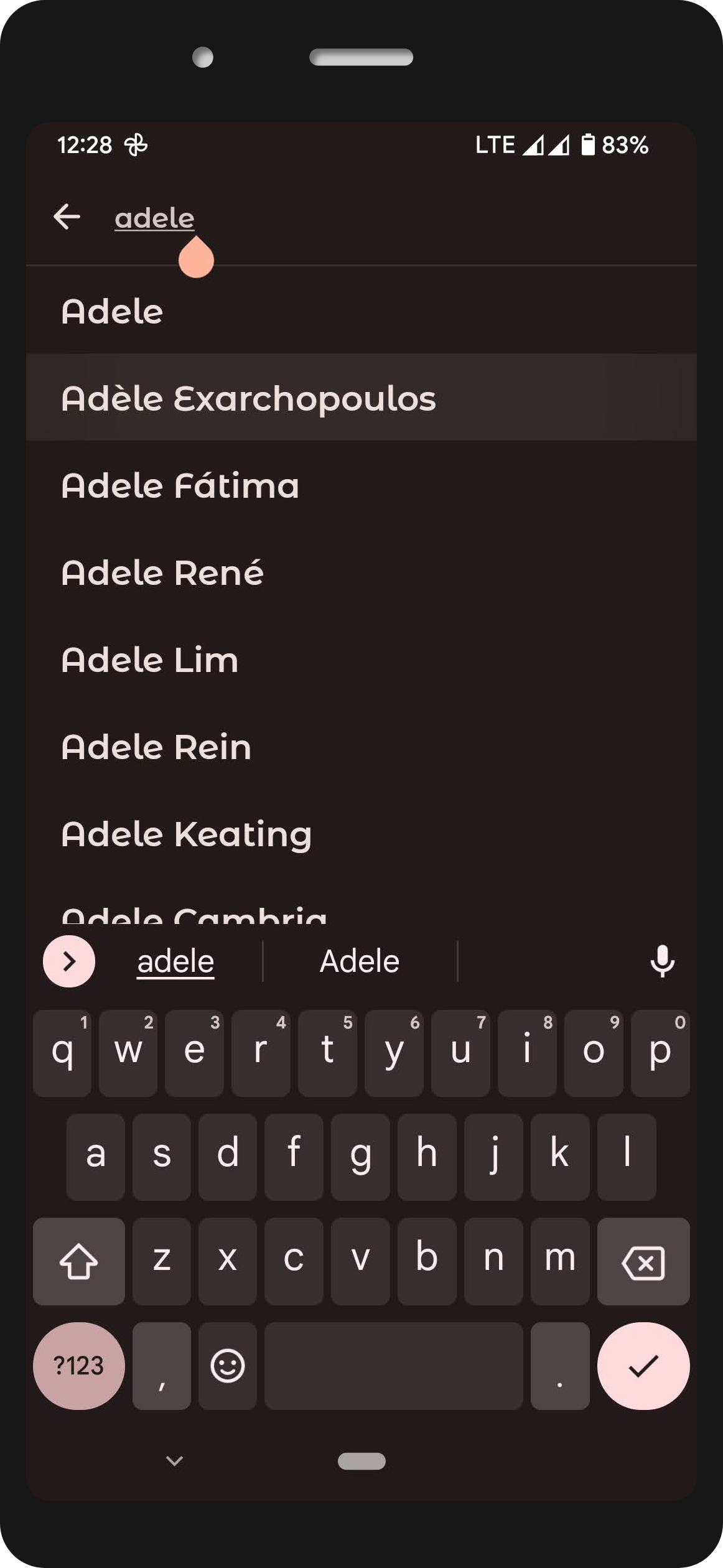
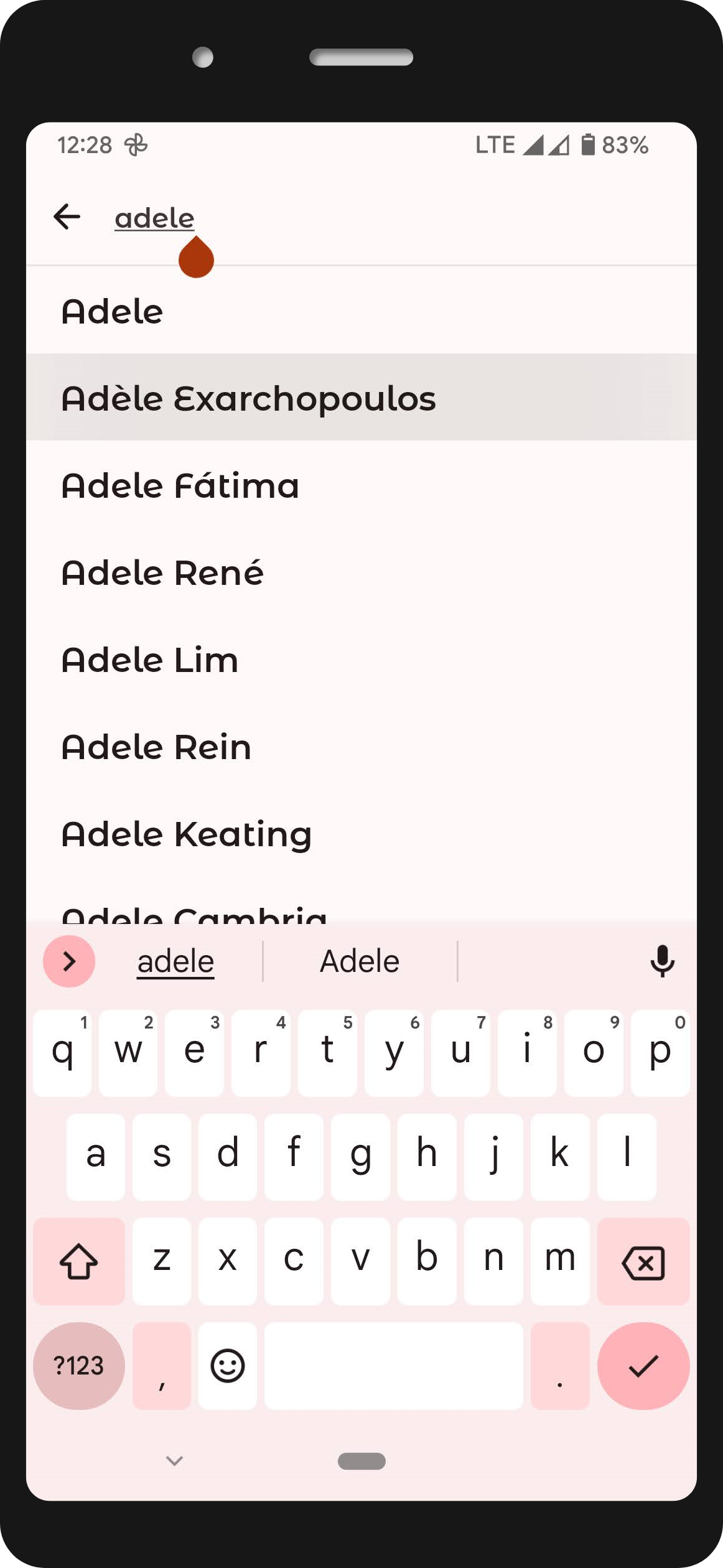
:page_facing_up: Type.kt | ## :cyclone: Image loading with Coil Reusable composable used in all screens to load image from an Url. ```kotlin @Composable fun LoadNetworkImage( imageUrl: String, contentDescription: String, modifier: Modifier, shape: Shape ) { Image( painter = rememberImagePainter( data = imageUrl, builder = { placeholder(R.drawable.animated_progress) error(R.drawable.ic_image_not_available) }), contentDescription = contentDescription, contentScale = ContentScale.Crop, modifier = modifier .clip(shape) .background(color = MaterialTheme.colors.surface) ) } ``` Then we will just call the composable anywhere in app screens. ```kotlin LoadNetworkImage( imageUrl = "https://image_url", contentDescription = stringResource(R.string.cd_movie_poster), modifier = Modifier.size(100.dp, 150.dp), shape = MaterialTheme.shapes.medium, ) ``` ## :art: App Theme ### :rainbow: Material Design 3. Followed theming and color practices from Material Theme Builder Web Tool. Learn more [here](https://material-foundation.github.io/material-theme-builder/) ### Color.kt ```kotlin // Light theme colors val light_primary = Color(0xFFaa370c) val light_onPrimary = Color(0xFFffffff) val light_background = Color(0xFFFFFAF9) val light_onBackground = Color(0xFF211a18) val light_surface = Color(0xFFFFE6DB) val light_onSurface = Color(0xFF211a18) // Dark theme colors val dark_primary = Color(0xFFffb59c) val dark_onPrimary = Color(0xFF5f1600) val dark_background = Color(0xFF211a18) val dark_onBackground = Color(0xFFede0dc) val dark_surface = Color(0xFF302522) val dark_onSurface = Color(0xFFede0dc) ``` ### Theme.kt ```kotlin val LightColorPalette = lightColors( primary = light_primary, onPrimary = light_onPrimary, background = light_background, onBackground = light_onBackground, surface = light_surface, onSurface = light_onSurface, ) val DarkColorPalette = darkColors( primary = dark_primary, onPrimary = dark_onPrimary, background = dark_background, onBackground = dark_onBackground, surface = dark_surface, onSurface = dark_onSurface ) ``` ### :white_circle::black_circle: Light/Dark theme screenshots | Home | Search | Detail | | :--: | :----: | :----: | |
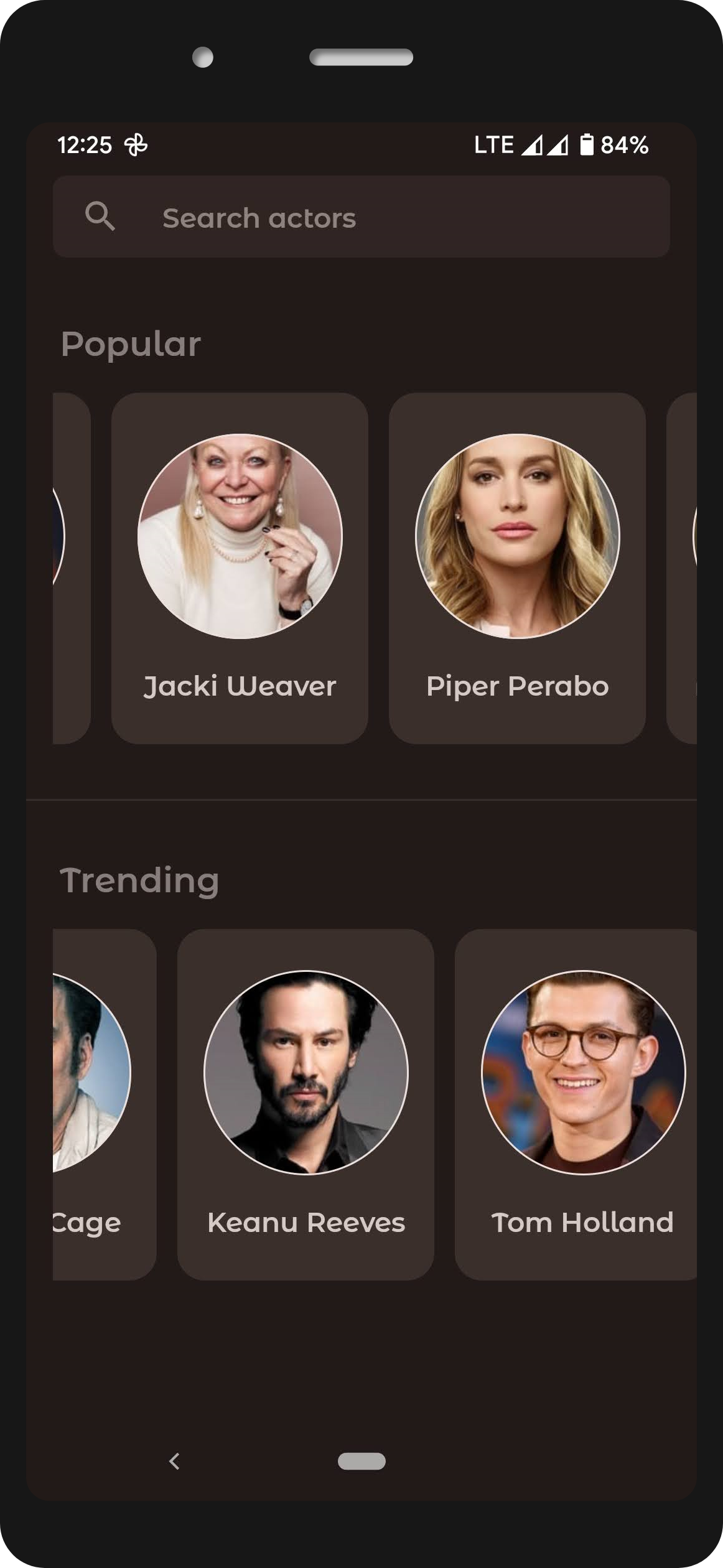
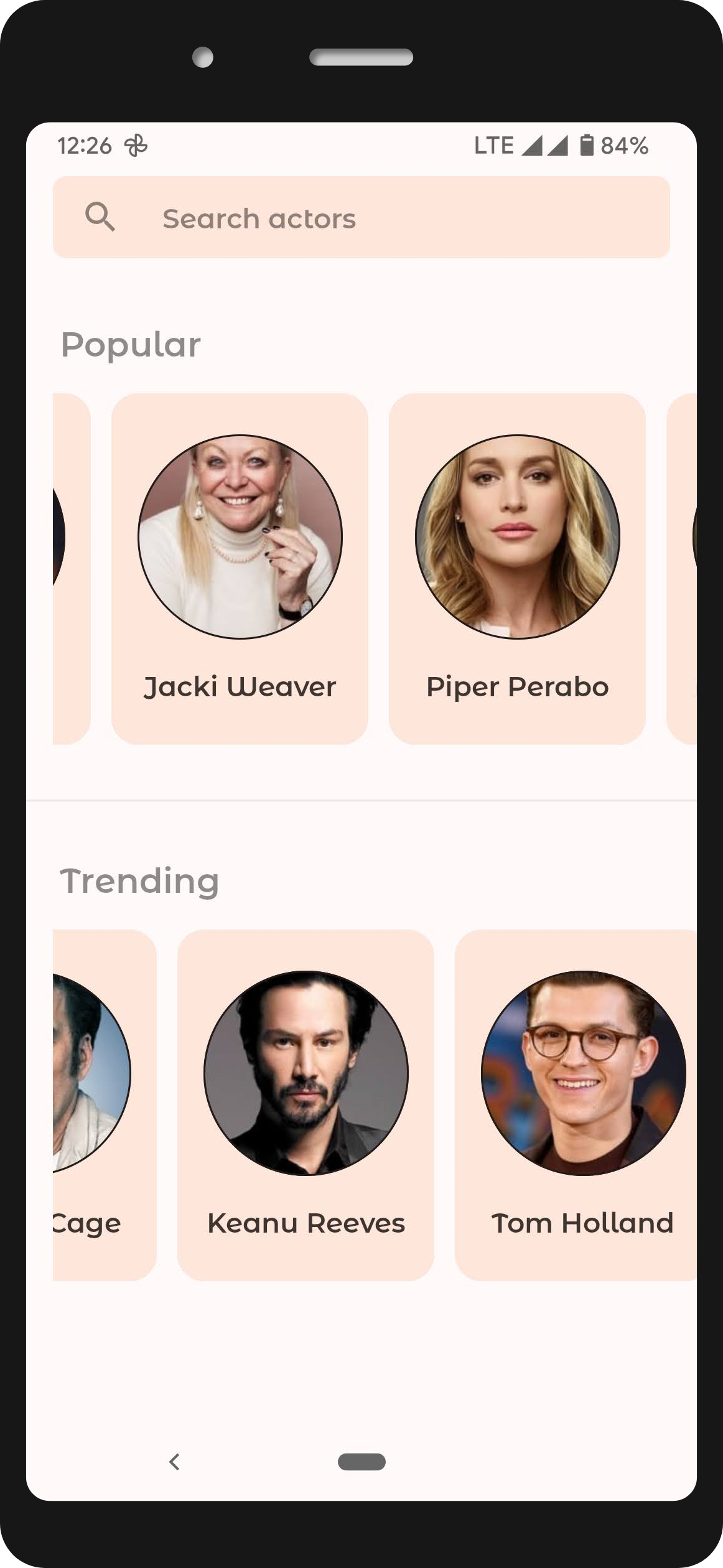 |
| 
 |
| 
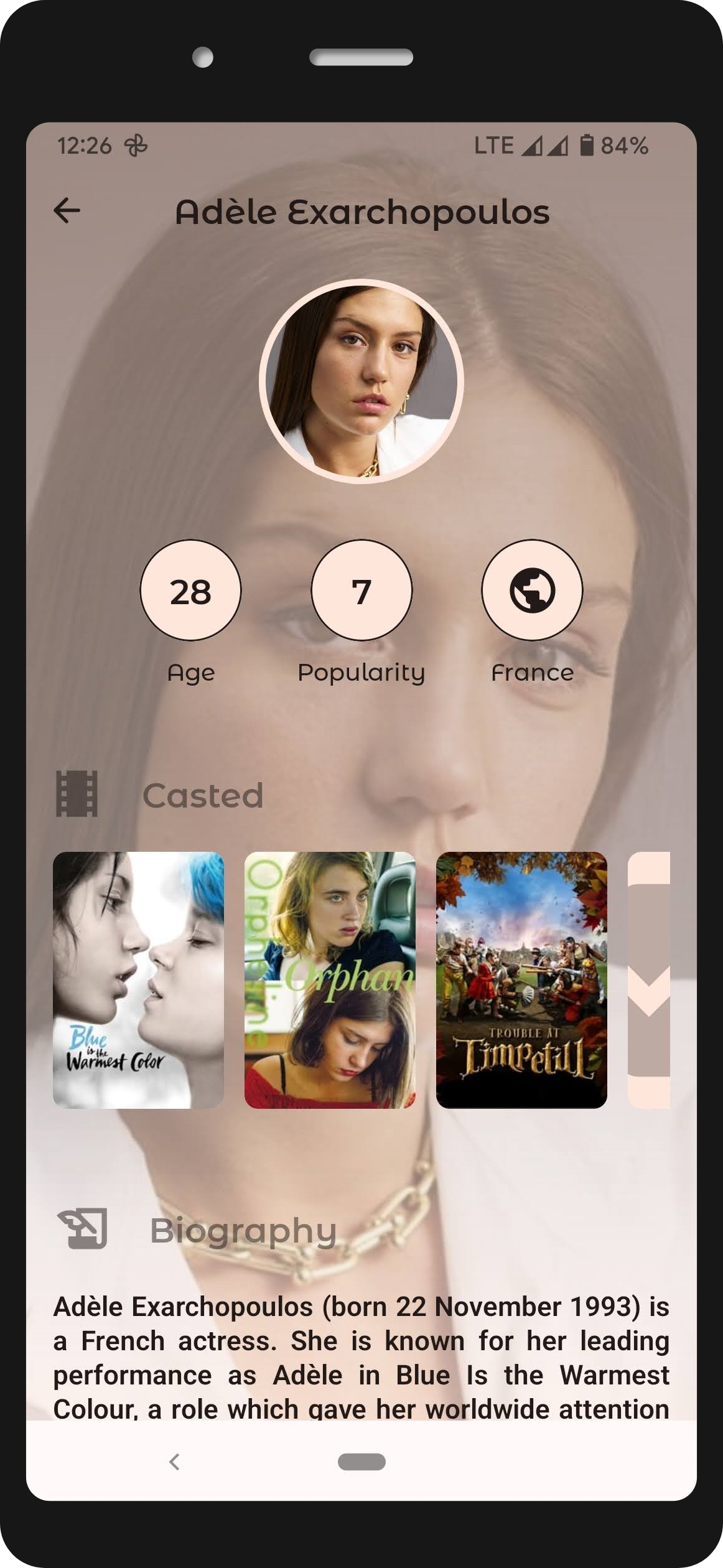 |
## :pencil: Blog
|
|
## :pencil: Blog
|  |
| :-: |
| **Reveal effect animations in compose jetpack android** |
| [*Read article*](https://developersbreach.com/reveal-effect-animations-compose-android/) |
|
|
| :-: |
| **Reveal effect animations in compose jetpack android** |
| [*Read article*](https://developersbreach.com/reveal-effect-animations-compose-android/) |
|  |
| :-: |
| **Compose and build android app with new architecture principles** |
| [*Read article*](https://developersbreach.com/compose-android-app-architecture/) |
|
|
| :-: |
| **Compose and build android app with new architecture principles** |
| [*Read article*](https://developersbreach.com/compose-android-app-architecture/) |
|  |
| :-: |
| **Custom shape animations pulsating circles on canvas in compose android** |
| [*Read article*](https://developersbreach.com/custom-shape-animations-pulsating-circles-canvas-compose/) |
|
|
| :-: |
| **Custom shape animations pulsating circles on canvas in compose android** |
| [*Read article*](https://developersbreach.com/custom-shape-animations-pulsating-circles-canvas-compose/) |
|  |
| :-: |
| **Search with TextField in list Compose Android Jetpack** |
| [*Read article*](https://developersbreach.com/search-with-textfield-list-compose/) |

## :bulb: Motivation and Context
`Jetpack Compose` is Android’s modern toolkit for building native UI. It enables you to quickly
bring your app to life with less code, powerful tools, and intuitive Kotlin APIs.
Understanding to implement own `Theme` `Shape` `Typography` `Color` has became bit easier by
referring to lot of official jetpack compose samples which are available in GitHub.
Best of all we got to do this in `Kotlin` way. Excited and long way to go from here.
## :trophy: Credits
### :rocket: JetCaster
Check the official [JetCaster](https://github.com/android/compose-samples/tree/main/Jetcaster) example from Android Team, I have used their code to generate Swatch with Palette Api in my Detail screen.
### :key: Tmdb Api
Images and all information in app belongs to and taken from [Tmdb Api](https://developers.themoviedb.org/3).
I do not own any of it and only made use of it for this app demonstration purpose.
Obtain your own Tmdb Api Key
from [here](https://www.themoviedb.org/settings/api)
## License
```
Copyright 2021 Rajasekhar K E
Licensed under the Apache License, Version 2.0 (the "License");
you may not use this file except in compliance with the License.
You may obtain a copy of the License at
https://www.apache.org/licenses/LICENSE-2.0
Unless required by applicable law or agreed to in writing, software
distributed under the License is distributed on an "AS IS" BASIS,
WITHOUT WARRANTIES OR CONDITIONS OF ANY KIND, either express or implied.
See the License for the specific language governing permissions and
limitations under the License.
```
|
| :-: |
| **Search with TextField in list Compose Android Jetpack** |
| [*Read article*](https://developersbreach.com/search-with-textfield-list-compose/) |

## :bulb: Motivation and Context
`Jetpack Compose` is Android’s modern toolkit for building native UI. It enables you to quickly
bring your app to life with less code, powerful tools, and intuitive Kotlin APIs.
Understanding to implement own `Theme` `Shape` `Typography` `Color` has became bit easier by
referring to lot of official jetpack compose samples which are available in GitHub.
Best of all we got to do this in `Kotlin` way. Excited and long way to go from here.
## :trophy: Credits
### :rocket: JetCaster
Check the official [JetCaster](https://github.com/android/compose-samples/tree/main/Jetcaster) example from Android Team, I have used their code to generate Swatch with Palette Api in my Detail screen.
### :key: Tmdb Api
Images and all information in app belongs to and taken from [Tmdb Api](https://developers.themoviedb.org/3).
I do not own any of it and only made use of it for this app demonstration purpose.
Obtain your own Tmdb Api Key
from [here](https://www.themoviedb.org/settings/api)
## License
```
Copyright 2021 Rajasekhar K E
Licensed under the Apache License, Version 2.0 (the "License");
you may not use this file except in compliance with the License.
You may obtain a copy of the License at
https://www.apache.org/licenses/LICENSE-2.0
Unless required by applicable law or agreed to in writing, software
distributed under the License is distributed on an "AS IS" BASIS,
WITHOUT WARRANTIES OR CONDITIONS OF ANY KIND, either express or implied.
See the License for the specific language governing permissions and
limitations under the License.
```