




 ## 🛥 Stream Chat & Video SDK
**Gemini Android** is built with __[Stream Chat SDK for Compose](https://getstream.io/chat/sdk/compose?utm_source=Github&utm_medium=Jaewoong_OSS&utm_content=Developer&utm_campaign=Github_Dec2024_Jaewoong_Gemini&utm_term=DevRelOss)__ to implement messaging systems. If you’re interested in building powerful real-time video/audio calling, audio room, and livestreaming, check out the __[Stream Video SDK for Compose](https://getstream.io/video/docs/android/tutorials/video-calling?utm_source=Github&utm_medium=Jaewoong_OSS&utm_content=Developer&utm_campaign=Github_Dec2024_Jaewoong_Gemini&utm_term=DevRelOss)__!
### Stream Chat
- [Stream Chat SDK for Android on GitHub](https://github.com/getStream/stream-chat-android)
- [Android Samples for Stream Chat SDK on GitHub](https://github.com/getStream/android-samples)
- [Stream Chat Compose UI Components Guidelines](https://getstream.io/chat/docs/sdk/android/compose/overview/)
### Stream Video
- [Stream Video SDK for Android on GitHub](https://github.com/getstream/stream-video-android?utm_source=Github&utm_medium=Jaewoong_OSS&utm_content=Developer&utm_campaign=Github_Dec2024_Jaewoong_Gemini&utm_term=DevRelOss)
- [Video Call Tutorial](https://getstream.io/video/docs/android/tutorials/video-calling?utm_source=Github&utm_medium=Jaewoong_OSS&utm_content=Developer&utm_campaign=Github_Dec2024_Jaewoong_Gemini&utm_term=DevRelOss)
- [Audio Room Tutorial](https://getstream.io/video/docs/android/tutorials/audio-room?utm_source=Github&utm_medium=Jaewoong_OSS&utm_content=Developer&utm_campaign=Github_Dec2024_Jaewoong_Gemini&utm_term=DevRelOss)
- [Livestream Tutorial](https://getstream.io/video/docs/android/tutorials/livestream?utm_source=Github&utm_medium=Jaewoong_OSS&utm_content=Developer&utm_campaign=Github_Dec2024_Jaewoong_Gemini&utm_term=DevRelOss)
## 💻 How to build the project?
To build this project properly, you should follow the instructions below:
1. Go to the __[Stream login page](https://getstream.io/try-for-free?utm_source=Github?utm_source=Github&utm_medium=Jaewoong_OSS&utm_content=Developer&utm_campaign=Github_Dec2024_Jaewoong_Gemini&utm_term=DevRelOss)__.
2. If you have your GitHub account, click the **SIGN UP WITH GITHUB** button and you can sign up within a couple of seconds.

3. If you don't have a GitHub account, fill in the inputs and click the **START FREE TRIAL** button.
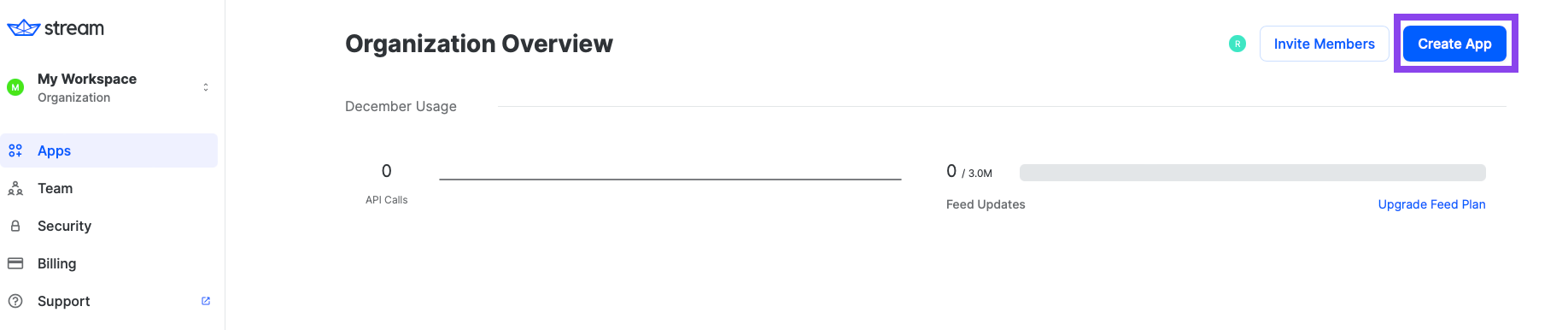
4. Go to the __[Dashboard](https://dashboard.getstream.io?utm_source=Github?utm_source=Github&utm_medium=Jaewoong_OSS&utm_content=Developer&utm_campaign=Github_Dec2024_Jaewoong_Gemini&utm_term=DevRelOss)__ and click the **Create App** button like the below.
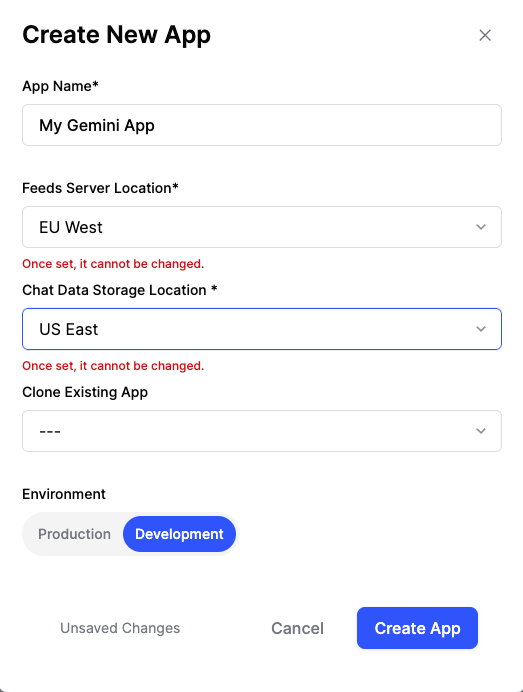
5. Fill in the blanks like the below and click the **Create App** button.
## 🛥 Stream Chat & Video SDK
**Gemini Android** is built with __[Stream Chat SDK for Compose](https://getstream.io/chat/sdk/compose?utm_source=Github&utm_medium=Jaewoong_OSS&utm_content=Developer&utm_campaign=Github_Dec2024_Jaewoong_Gemini&utm_term=DevRelOss)__ to implement messaging systems. If you’re interested in building powerful real-time video/audio calling, audio room, and livestreaming, check out the __[Stream Video SDK for Compose](https://getstream.io/video/docs/android/tutorials/video-calling?utm_source=Github&utm_medium=Jaewoong_OSS&utm_content=Developer&utm_campaign=Github_Dec2024_Jaewoong_Gemini&utm_term=DevRelOss)__!
### Stream Chat
- [Stream Chat SDK for Android on GitHub](https://github.com/getStream/stream-chat-android)
- [Android Samples for Stream Chat SDK on GitHub](https://github.com/getStream/android-samples)
- [Stream Chat Compose UI Components Guidelines](https://getstream.io/chat/docs/sdk/android/compose/overview/)
### Stream Video
- [Stream Video SDK for Android on GitHub](https://github.com/getstream/stream-video-android?utm_source=Github&utm_medium=Jaewoong_OSS&utm_content=Developer&utm_campaign=Github_Dec2024_Jaewoong_Gemini&utm_term=DevRelOss)
- [Video Call Tutorial](https://getstream.io/video/docs/android/tutorials/video-calling?utm_source=Github&utm_medium=Jaewoong_OSS&utm_content=Developer&utm_campaign=Github_Dec2024_Jaewoong_Gemini&utm_term=DevRelOss)
- [Audio Room Tutorial](https://getstream.io/video/docs/android/tutorials/audio-room?utm_source=Github&utm_medium=Jaewoong_OSS&utm_content=Developer&utm_campaign=Github_Dec2024_Jaewoong_Gemini&utm_term=DevRelOss)
- [Livestream Tutorial](https://getstream.io/video/docs/android/tutorials/livestream?utm_source=Github&utm_medium=Jaewoong_OSS&utm_content=Developer&utm_campaign=Github_Dec2024_Jaewoong_Gemini&utm_term=DevRelOss)
## 💻 How to build the project?
To build this project properly, you should follow the instructions below:
1. Go to the __[Stream login page](https://getstream.io/try-for-free?utm_source=Github?utm_source=Github&utm_medium=Jaewoong_OSS&utm_content=Developer&utm_campaign=Github_Dec2024_Jaewoong_Gemini&utm_term=DevRelOss)__.
2. If you have your GitHub account, click the **SIGN UP WITH GITHUB** button and you can sign up within a couple of seconds.

3. If you don't have a GitHub account, fill in the inputs and click the **START FREE TRIAL** button.
4. Go to the __[Dashboard](https://dashboard.getstream.io?utm_source=Github?utm_source=Github&utm_medium=Jaewoong_OSS&utm_content=Developer&utm_campaign=Github_Dec2024_Jaewoong_Gemini&utm_term=DevRelOss)__ and click the **Create App** button like the below.

5. Fill in the blanks like the below and click the **Create App** button.
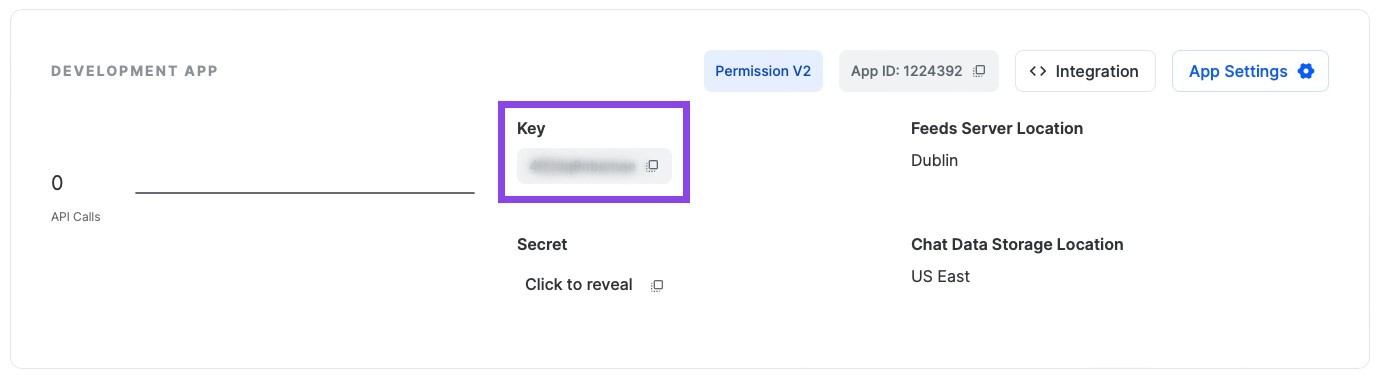
 6. You will see the **Key** like the image below and then copy it.
7. Create a new file named **secrets.properties** on the root directory of this Android project, and add the key to the `secrets.properties` file like the below:

```gradle
STREAM_API_KEY=..
```
8. Go to your __[Dashboard](https://dashboard.getstream.io?utm_source=Github?utm_source=Github&utm_medium=Jaewoong_OSS&utm_content=Developer&utm_campaign=Github_Dec2024_Jaewoong_Gemini&utm_term=DevRelOss)__ again and click your App.
9. In the **Overview** menu, you can find the **Authentication** category by scrolling to the middle of the page.
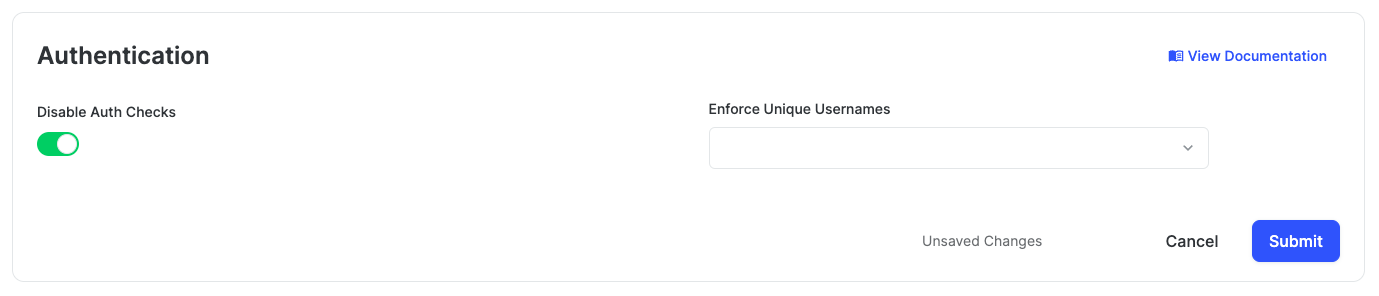
10. Switch on the **Disable Auth Checks** option and click the **Submit** button like the image below.
11. Click the **Explorer** tab on the left side menu.
12. Click **users** -> **Create New User** button sequentially and add fill in the user like the below:
6. You will see the **Key** like the image below and then copy it.

7. Create a new file named **secrets.properties** on the root directory of this Android project, and add the key to the `secrets.properties` file like the below:

```gradle
STREAM_API_KEY=..
```
8. Go to your __[Dashboard](https://dashboard.getstream.io?utm_source=Github?utm_source=Github&utm_medium=Jaewoong_OSS&utm_content=Developer&utm_campaign=Github_Dec2024_Jaewoong_Gemini&utm_term=DevRelOss)__ again and click your App.
9. In the **Overview** menu, you can find the **Authentication** category by scrolling to the middle of the page.
10. Switch on the **Disable Auth Checks** option and click the **Submit** button like the image below.

11. Click the **Explorer** tab on the left side menu.
12. Click **users** -> **Create New User** button sequentially and add fill in the user like the below:
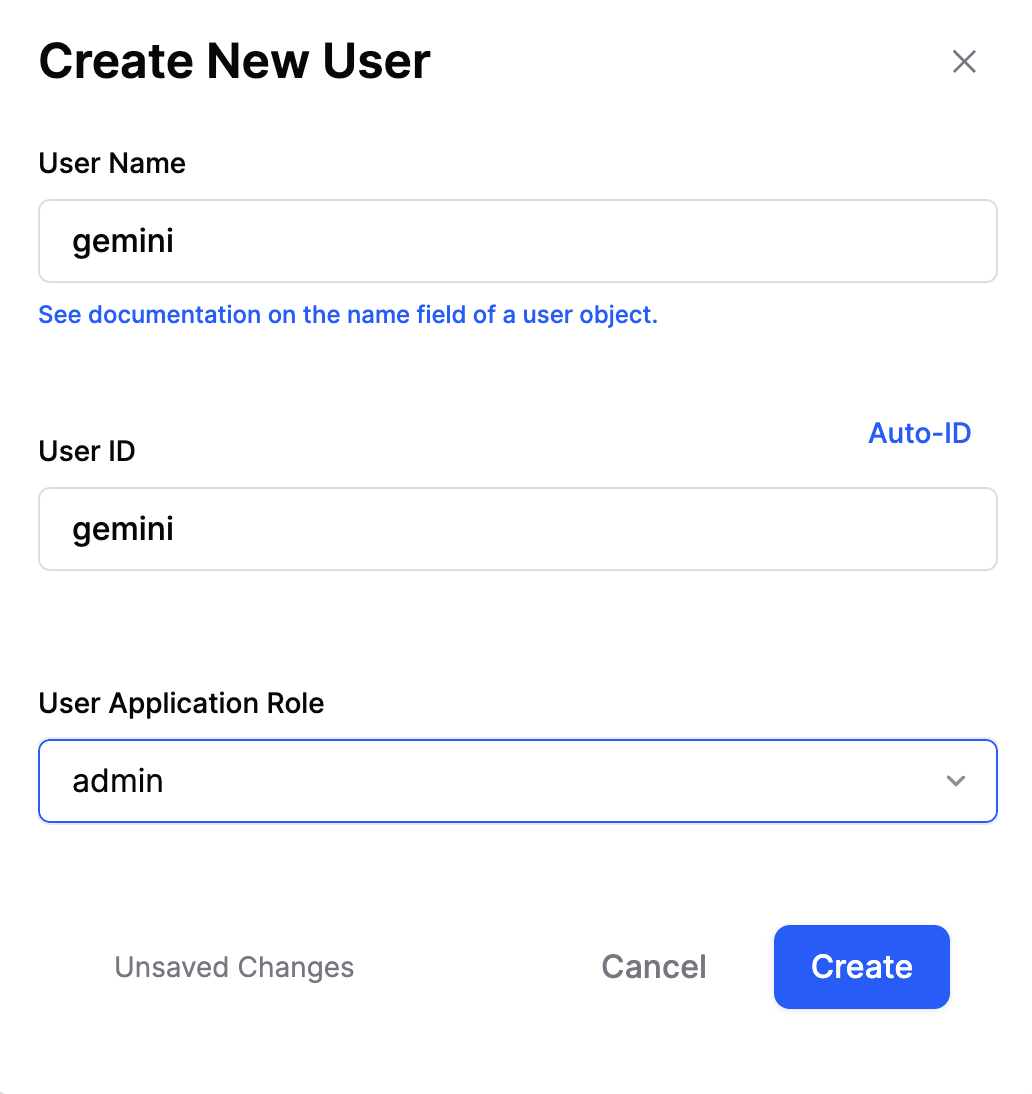 - User Name: `gemini`
- User ID: `gemini`
13. Go to **[Google AI Studio](https://makersuite.google.com/app/apikey)**, login with your Google account and select the **Get API key** on the menu left like the image below:
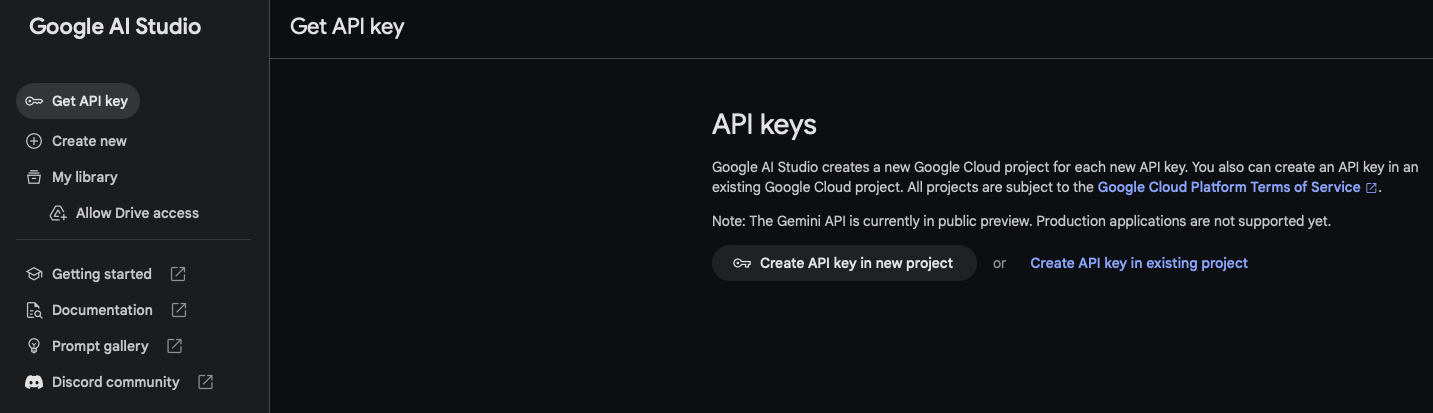
14. Create your API key for using generative AI SDKs, and you'll get one like the image below:
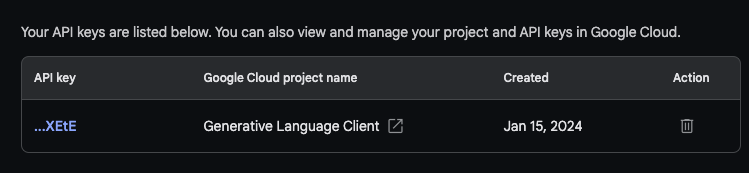
15. Add the key to the `secrets.properties` file like the below:

```gradle
GEMINI_API_KEY=..
```
16. Build and run the project.
## 🛠 Tech Stack & Open Source Libraries
- Minimum SDK level 21.
- 100% [Jetpack Compose](https://developer.android.com/jetpack/compose) based + [Coroutines](https://github.com/Kotlin/kotlinx.coroutines) + [Flow](https://kotlin.github.io/kotlinx.coroutines/kotlinx-coroutines-core/kotlinx.coroutines.flow/) for asynchronous.
- [Compose Chat SDK for Messaging](https://getstream.io/chat/sdk/compose?utm_source=Github?utm_source=Github&utm_medium=Jaewoong_OSS&utm_content=Developer&utm_campaign=Github_Dec2024_Jaewoong_Gemini&utm_term=DevRelOss): The Jetpack Compose Chat Messaging SDK is built on a low-level chat client and provides modular, customizable Compose UI components that you can easily drop into your app.
- Jetpack
- Compose: Android’s modern toolkit for building native UI.
- ViewModel: UI related data holder and lifecycle aware.
- App Startup: Provides a straightforward, performant way to initialize components at application startup.
- Navigation: For navigating screens and [Hilt Navigation Compose](https://developer.android.com/jetpack/compose/libraries#hilt) for injecting dependencies.
- Room: Constructs Database by providing an abstraction layer over SQLite to allow fluent database access.
- Datastore: Store data asynchronously, consistently, and transactionally, overcoming some of the drawbacks of SharedPreferences.
- [Hilt](https://dagger.dev/hilt/): Dependency Injection.
- [Landscapist Glide](https://github.com/skydoves/landscapist#glide), [animation](https://github.com/skydoves/landscapist#animation), [placeholder](https://github.com/skydoves/landscapist#placeholder): Jetpack Compose image loading library that fetches and displays network images with Glide, Coil, and Fresco.
- [Retrofit2 & OkHttp3](https://github.com/square/retrofit): Construct the REST APIs and paging network data.
- [Sandwich](https://github.com/skydoves/Sandwich): Construct a lightweight and modern response interface to handle network payload for Android.
- [Moshi](https://github.com/square/moshi/): A modern JSON library for Kotlin and Java.
- [ksp](https://github.com/google/ksp): Kotlin Symbol Processing API.
- [Balloon](https://github.com/skydoves/balloon): Modernized and sophisticated tooltips, fully customizable with an arrow and animations for Android.
- [StreamLog](https://github.com/GetStream/stream-log): A lightweight and extensible logger library for Kotlin and Android.
- Baseline Profiles: To improve app performance by including a list of classes and methods specifications in your APK that can be used by Android Runtime.
## 🏛️ Architecture
**Gemini Android** follows the [Google's official architecture guidance](https://developer.android.com/topic/architecture).
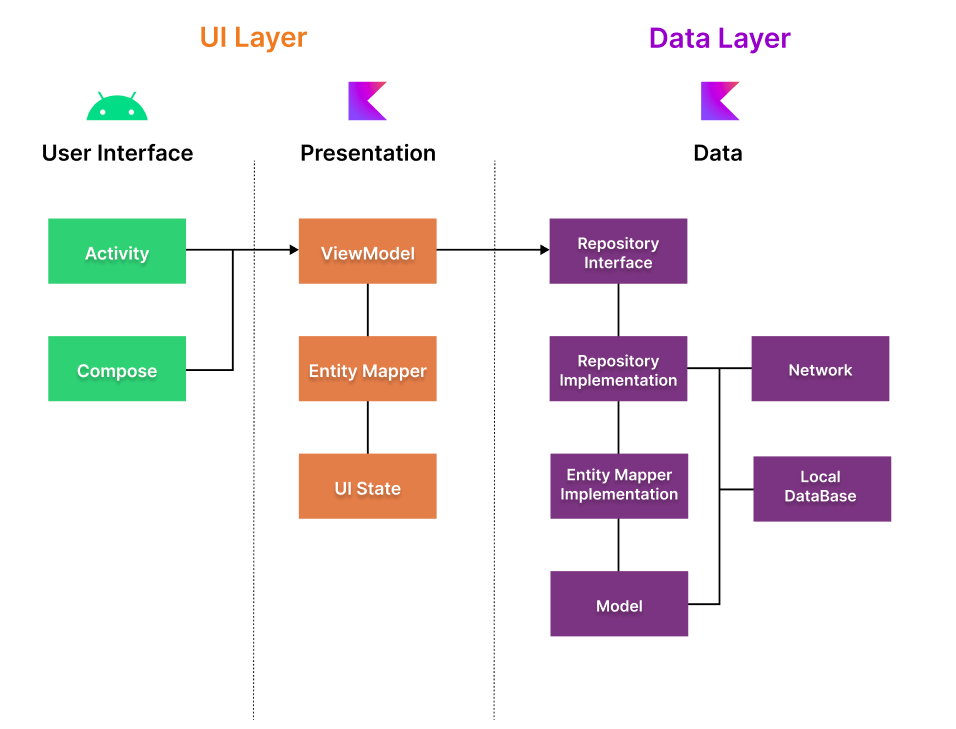
**Gemini Android** was built with [Guide to app architecture](https://developer.android.com/topic/architecture), so it would be a great sample to show how the architecture works in real-world projects.
- User Name: `gemini`
- User ID: `gemini`
13. Go to **[Google AI Studio](https://makersuite.google.com/app/apikey)**, login with your Google account and select the **Get API key** on the menu left like the image below:

14. Create your API key for using generative AI SDKs, and you'll get one like the image below:

15. Add the key to the `secrets.properties` file like the below:

```gradle
GEMINI_API_KEY=..
```
16. Build and run the project.
## 🛠 Tech Stack & Open Source Libraries
- Minimum SDK level 21.
- 100% [Jetpack Compose](https://developer.android.com/jetpack/compose) based + [Coroutines](https://github.com/Kotlin/kotlinx.coroutines) + [Flow](https://kotlin.github.io/kotlinx.coroutines/kotlinx-coroutines-core/kotlinx.coroutines.flow/) for asynchronous.
- [Compose Chat SDK for Messaging](https://getstream.io/chat/sdk/compose?utm_source=Github?utm_source=Github&utm_medium=Jaewoong_OSS&utm_content=Developer&utm_campaign=Github_Dec2024_Jaewoong_Gemini&utm_term=DevRelOss): The Jetpack Compose Chat Messaging SDK is built on a low-level chat client and provides modular, customizable Compose UI components that you can easily drop into your app.
- Jetpack
- Compose: Android’s modern toolkit for building native UI.
- ViewModel: UI related data holder and lifecycle aware.
- App Startup: Provides a straightforward, performant way to initialize components at application startup.
- Navigation: For navigating screens and [Hilt Navigation Compose](https://developer.android.com/jetpack/compose/libraries#hilt) for injecting dependencies.
- Room: Constructs Database by providing an abstraction layer over SQLite to allow fluent database access.
- Datastore: Store data asynchronously, consistently, and transactionally, overcoming some of the drawbacks of SharedPreferences.
- [Hilt](https://dagger.dev/hilt/): Dependency Injection.
- [Landscapist Glide](https://github.com/skydoves/landscapist#glide), [animation](https://github.com/skydoves/landscapist#animation), [placeholder](https://github.com/skydoves/landscapist#placeholder): Jetpack Compose image loading library that fetches and displays network images with Glide, Coil, and Fresco.
- [Retrofit2 & OkHttp3](https://github.com/square/retrofit): Construct the REST APIs and paging network data.
- [Sandwich](https://github.com/skydoves/Sandwich): Construct a lightweight and modern response interface to handle network payload for Android.
- [Moshi](https://github.com/square/moshi/): A modern JSON library for Kotlin and Java.
- [ksp](https://github.com/google/ksp): Kotlin Symbol Processing API.
- [Balloon](https://github.com/skydoves/balloon): Modernized and sophisticated tooltips, fully customizable with an arrow and animations for Android.
- [StreamLog](https://github.com/GetStream/stream-log): A lightweight and extensible logger library for Kotlin and Android.
- Baseline Profiles: To improve app performance by including a list of classes and methods specifications in your APK that can be used by Android Runtime.
## 🏛️ Architecture
**Gemini Android** follows the [Google's official architecture guidance](https://developer.android.com/topic/architecture).

**Gemini Android** was built with [Guide to app architecture](https://developer.android.com/topic/architecture), so it would be a great sample to show how the architecture works in real-world projects.