 coco
coco
531 lines
26 KiB
Markdown
531 lines
26 KiB
Markdown
|
||
|
||
|
||
# AAInfographics
|
||
|
||
|
||
[](https://github.com/AAChartModel/AAChartCore-Kotlin) </br>
|
||
[](https://github.com/AAChartModel/AAChartCore-Kotlin/blob/master/LICENSE)</br>
|
||
[](https://github.com/AAChartModel/AAChartCore-Kotlin) </br>
|
||
[](https://github.com/AAChartModel/AAChartCore)</br>
|
||
[](https://github.com/AAChartModel/AAChartCore-Kotlin/blob/master/CHINESE-README.md#当前已支持的图表渲染动画类型有三十种以上说明如下)</br>
|
||
[](https://github.com/AAChartModel/AAChartCore-Kotlin/blob/master/CHINESE-README.md)</br>
|
||
[](https://github.com/AAChartModel/AAChartCore-Kotlin)</br>
|
||
[](http://isitmaintained.com/project/AAChartModel/AAChartCore-Kotlin "Average time to resolve an issue")</br>
|
||
[](http://isitmaintained.com/project/AAChartModel/AAChartCore-Kotlin "Percentage of issues still open")
|
||
|
||
|
||
## [ **English Document 🇬🇧** ](https://github.com/AAChartModel/AAChartCore-Kotlin) | [ **简体中文文档 🇨🇳** ](https://github.com/AAChartModel/AAChartCore-Kotlin/blob/master/CHINESE-README.md)
|
||
|
||
### 您所喜爱的`AAInfographics`开源图表框架同时更有`Java`版本可供使用,详情请点击以下链接
|
||
### 传送门
|
||
#### *https://github.com/AAChartModel/AAChartCore*
|
||
|
||
## 前言
|
||
|
||
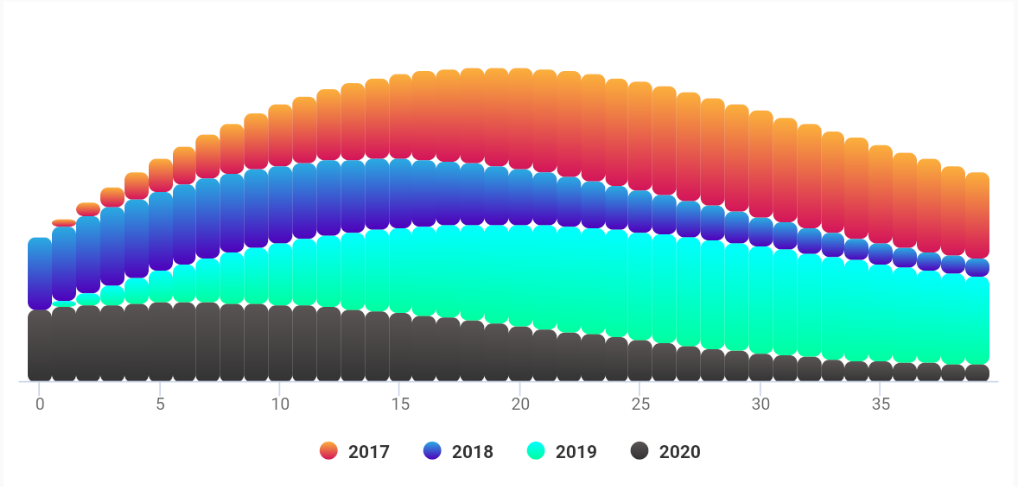
***AAInfographics***,是 [AAChartKit](https://github.com/AAChartModel/AAChartKit) 的 `Kotlin`语言版本,是在流行的开源前端图表框架 [Highcharts](https://www.hcharts.cn) 的基础上,封装的面向对象的,一组简单易用,极其精美的图表绘制组件.可能是这个星球上 UI 最精致的第三方 Android 开源图表框架了(✟我以无神论者的名义向上帝起誓🖐,我真的没有在说鬼话✟)
|
||
|
||
***
|
||
## 功能特性
|
||
|
||
1. **环境友好,兼容性强**. 支持 `Kotlin`语言,配置简单.同时更有苹果公司的 iOS 端 Objective-C 版本 [AAChartKit](https://github.com/AAChartModel/AAChartKit)、Swift 版本 [AAChartKit-Swift](https://github.com/AAChartModel/AAChartKit-Swift)、谷歌公司的 Android 端 Java 版本 [AAChartCore](https://github.com/AAChartModel/AAChartCore)、等其他各种移动平台主流语言版本可供使用.
|
||
1. **功能强大,类型多样**. 支持`柱状图` 、`条形图` 、`折线图` 、`曲线图` 、`折线填充图` 、`曲线填充图`、`雷达图`、`极地图`、`扇形图`、`气泡图`、`散点图`、`区域范围图`、`柱形范围图`、`面积范围图`、`面积范围均线图`、`直方折线图`、`直方折线填充图`、`箱线图`、`瀑布图`、`热力图`、`桑基图`、`金字塔图`、`漏斗图`、等二十几种类型的图形,不可谓之不多.
|
||
1. **交互式图形动画**. 有着清晰和充满细节的用户交互方式,与此同时,图形渲染`动画`效果细腻精致,流畅优美.有三十多种以上渲染动画效果可供选择,用户可自由设置渲染图形时的动画时间和动画类型,关于图形渲染动画类型,具体参见[ AAInfographics 动画类型](https://github.com/AAChartModel/AAChartCore-Kotlin/blob/master/CHINESE-README.md#当前已支持的图表渲染动画类型有三十种以上说明如下).
|
||
1. **支持手势缩放**.支持图表的手势缩放和拖动阅览,手势缩放类型具体参见[ AAInfographics 手势缩放类型](https://github.com/AAChartModel/AAChartCore-Kotlin/blob/master/CHINESE-README.md#当前已支持的图表手势缩放类型共有三种说明如下),默认禁用手势缩放功能.
|
||
1. **极简主义**. `AAChartView + AAChartModel = Chart`,在 ***AAInfographics*** 数据可视化图形框架当中,遵循这样一个极简主义公式:`图表视图控件 + 图表模型 = 你想要的图表`.同其他几款强大、精美而又易用的开源图形框架 [AAChartKit](https://github.com/AAChartModel/AAChartKit)、[AAChartKit-Swift](https://github.com/AAChartModel/AAChartKit-Swift)、[AAChartCore](https://github.com/AAChartModel/AAChartCore) 完全一致.
|
||
1. **链式编程语法**. 支持系统类推荐的 `链式编程语法`,一行代码即可配置完成 `AAChartModel`模型对象实例.
|
||
1. **简洁清晰,轻便易用**. 最少仅仅需要 **五行代码** 即可完成整个图表的绘制工作(使用链式编程语法配置 `AAChartModel` 实例对象时,无论你写多少行代码,理论上只能算作是一行). 😜😜😜
|
||
|
||
***
|
||
|
||
## 真机美图
|
||
|
||
<div>
|
||
<img src='https://github.com/AAChartModel/loadHtmlCssJsDemo-master/blob/master/AAChartKit/BeautyAppreciation/ColumnChart.png' width="24%" >
|
||
<img src='https://github.com/AAChartModel/loadHtmlCssJsDemo-master/blob/master/AAChartKit/BeautyAppreciation/BarChart.png' width="24%" >
|
||
<img src='https://github.com/AAChartModel/loadHtmlCssJsDemo-master/blob/master/AAChartKit/BeautyAppreciation/AreaChart.png' width="24%" >
|
||
<img src='https://github.com/AAChartModel/loadHtmlCssJsDemo-master/blob/master/AAChartKit/BeautyAppreciation/LineChart.png' width="24%" >
|
||
</div>
|
||
|
||
<div>
|
||
<img src='https://github.com/AAChartModel/loadHtmlCssJsDemo-master/blob/master/AAChartKit/BeautyAppreciation/StepAreaChart.png' width="24%" >
|
||
<img src='https://github.com/AAChartModel/loadHtmlCssJsDemo-master/blob/master/AAChartKit/BeautyAppreciation/StepLineChart.png' width="24%" >
|
||
<img src='https://raw.githubusercontent.com/AAChartModel/Gallery/master/AAChartKit/splineChart.png' width="24%" >
|
||
<img src='https://raw.githubusercontent.com/AAChartModel/Gallery/master/AAChartKit/areasplineChart.png' width="24%" >
|
||
</div>
|
||
|
||
<div>
|
||
<img src='https://raw.githubusercontent.com/AAChartModel/Gallery/master/AAChartKit/percentStackingAreasplineChart.png' width="24%" >
|
||
<img src='https://github.com/AAChartModel/Gallery/blob/master/AAInfographics/BubbleChart.png' width="24%">
|
||
<img src='https://github.com/AAChartModel/Gallery/blob/master/AAInfographics/ArearangeAverageValueChart.png' width="24%">
|
||
<img src='https://github.com/AAChartModel/Gallery/blob/master/AAInfographics/ColumnMixedLineChart.png' width="24%">
|
||
</div>
|
||
|
||
<div>
|
||
<img src='https://raw.githubusercontent.com/AAChartModel/Gallery/master/AAChartKit/scatterChart.png' width="24%" >
|
||
<img src='https://raw.githubusercontent.com/AAChartModel/Gallery/master/AAChartKit/boxplotChart.png' width="24%">
|
||
<img src='https://raw.githubusercontent.com/AAChartModel/Gallery/master/AAChartKit/MirrorColumnChart.png' width="24%">
|
||
<img src='https://raw.githubusercontent.com/AAChartModel/Gallery/master/AAChartKit/stackingColumnChart.png' width="24%">
|
||
</div>
|
||
|
||
## 安装
|
||
|
||
### 通过 Gradle 安装
|
||
|
||
#### Step 1. 添加 `JitPack 仓库支持` 到你的 `build` 文件中
|
||
|
||
在**项目根目录**的 `build.gradle(注意:不是 app/build.gradle)` 中添加对 `JitPack` 的支持:
|
||
|
||
```groovy
|
||
allprojects {
|
||
repositories {
|
||
...
|
||
maven { url 'https://www.jitpack.io' }
|
||
}
|
||
}
|
||
```
|
||
|
||
#### Step 2. 添加 `AAChartCore-Kotlin(AAInfographics)` 依赖
|
||
|
||
```groovy
|
||
dependencies {
|
||
implementation 'com.github.AAChartModel:AAChartCore-Kotlin:-SNAPSHOT'
|
||
}
|
||
```
|
||
|
||
## 使用方法
|
||
|
||
1. 创建视图*AAChartView*
|
||
|
||
```xml
|
||
<com.github.aachartmodel.aainfographics.aachartcreator.AAChartView
|
||
android:id="@+id/aa_chart_view"
|
||
android:layout_width="match_parent"
|
||
android:layout_height="match_parent">
|
||
|
||
</com.github.aachartmodel.aainfographics.aachartcreator.AAChartView>
|
||
```
|
||
|
||
```kotlin
|
||
val aaChartView = findViewById<AAChartView>(R.id.aa_chart_view)
|
||
```
|
||
2. 配置视图模型*AAChartModel*
|
||
|
||
* 链式编程的方式配置 *AAChartModel* 模型对象属性
|
||
```kotlin
|
||
val aaChartModel = AAChartModel()
|
||
.chartType(AAChartType.Area)
|
||
.title("title")
|
||
.subtitle("subtitle")
|
||
.backgroundColor("#4b2b7f")
|
||
.dataLabelEnabled(true)
|
||
.series(arrayOf(
|
||
AASeriesElement()
|
||
.name("Tokyo")
|
||
.data(arrayOf(7.0, 6.9, 9.5, 14.5, 18.2, 21.5, 25.2, 26.5, 23.3, 18.3, 13.9, 9.6)),
|
||
AASeriesElement()
|
||
.name("NewYork")
|
||
.data(arrayOf(0.2, 0.8, 5.7, 11.3, 17.0, 22.0, 24.8, 24.1, 20.1, 14.1, 8.6, 2.5)),
|
||
AASeriesElement()
|
||
.name("London")
|
||
.data(arrayOf(0.9, 0.6, 3.5, 8.4, 13.5, 17.0, 18.6, 17.9, 14.3, 9.0, 3.9, 1.0)),
|
||
AASeriesElement()
|
||
.name("Berlin")
|
||
.data(arrayOf(3.9, 4.2, 5.7, 8.5, 11.9, 15.2, 17.0, 16.6, 14.2, 10.3, 6.6, 4.8))
|
||
)
|
||
)
|
||
```
|
||
|
||
3. 绘制图形(创建 AAChartView 实例对象后,首次绘制图形调用此方法)
|
||
|
||
```kotlin
|
||
/*图表视图对象调用图表模型对象,绘制最终图形*/
|
||
aaChartView.aa_drawChartWithChartModel(aaChartModel)
|
||
```
|
||
|
||
🌹🌹🌹 好了,至此,有关于绘制图形的任务,一切皆已经搞定!!! 你将得到你想要的任意图形!!!
|
||
|
||
### 更新图形内容
|
||
如果你需要更新图表内容,你应该阅读以下内容,根据你的实际需要,选择调用适合你的函数
|
||
|
||
* 仅仅刷新图形的`series`数据内容(首次绘制图形完成之后,后续刷新图表数据均建议调用此方法)
|
||
|
||
```kotlin
|
||
/*仅仅更新了图表的series数组数据,不改动图表的其他内容*/
|
||
aaChartView.aa_onlyRefreshTheChartDataWithChartModelSeries(chartModelSeriesArray)
|
||
```
|
||
|
||
* 刷新图形除数据属性 `series` 以外的其他属性(首次绘制图形完成之后,后续刷新图表的属性均建议调用此方法 注意:仅仅刷新图形数据,则建议使用上面的👆`aa_onlyRefreshTheChartDataWithChartModelSeries`方法)
|
||
|
||
```kotlin
|
||
/*更新 AAChartModel 整体内容(如修改了图表的类型,将 column chart 改为 area chart)之后,刷新图表*/
|
||
aaChartView.aa_refreshChartWholeContentWithChartModel(aaChartModel)
|
||
```
|
||
|
||
|
||
## **AAInfographics**一些重要属性经过配置之后的图形示例如下
|
||
|
||
- ### line chart - 折线图
|
||
|
||

|
||
|
||
- ### column chart - 柱形图
|
||
|
||

|
||
|
||
- ### bar chart - 条形图
|
||
|
||

|
||
|
||
- ### special area chart one - 常规折线区域填充图
|
||
|
||

|
||
|
||
- ### special area chart two - 带有负数的区域填充图
|
||
|
||
)
|
||
|
||
- ### special area chart three - 堆积效果的区域填充图
|
||
|
||

|
||
|
||
- ### polar chart - 极地图
|
||
|
||

|
||
|
||
- ### radar chart - 雷达图
|
||
|
||

|
||
|
||
- ### pie chart - 扇形图
|
||
|
||

|
||
|
||
- ### bubble chart - 气泡图
|
||
|
||

|
||
|
||
- ### scatter chart - 散点图
|
||
|
||

|
||
|
||
- ### arearange chart - 区域范围图
|
||
|
||

|
||
|
||
- ### step area chart - 直方折线填充图
|
||
|
||

|
||
|
||
- ### mixed chart - 混合图形
|
||
|
||

|
||
|
||
|
||
### 更多图形效果
|
||
注意:如下的这幅`DEMO演示图`为大小*6M*左右的`GIF动态图`,如未显示动态效果则说明图片资源未全部加载。请耐心等待至图片资源内容完全加载结束后,即可最终观赏更多的项目的动态演示效果.
|
||
|
||

|
||
|
||
|
||
## 特别说明
|
||
|
||
### 支持监听用户点击事件及单指滑动事件
|
||
|
||
可通过给 AAChartView 实例对象设置代理方法,来实现监听用户的点击事件和单指滑动事件
|
||
```kotlin
|
||
interface AAChartViewCallBack {
|
||
fun chartViewMoveOverEventMessage(aaChartView: AAChartView, messageModel: AAMoveOverEventMessageModel)
|
||
}
|
||
```
|
||
|
||
在监听用户交互事件时,获取的事件信息`AAMoveOverEventMessageModel`共包含以下内容
|
||
|
||
```kotlin
|
||
class AAMoveOverEventMessageModel {
|
||
var name: String? = null
|
||
var x: Double? = null
|
||
var y: Double? = null
|
||
var category: String? = null
|
||
var offset: LinkedTreeMap<*, *>? = null
|
||
var index: Double? = null
|
||
}
|
||
```
|
||
|
||
|
||
|
||
### 支持通过`JavaScript` 函数来自定义 `AATooltip`视图显示效果
|
||
|
||
有时系统默认的 tooltip 浮动提示框的显示效果无法满足使用者的特殊自定义要求,此时可以通过添加 AATooltip 的 `headerFormat`、`footerFormat` 和 `pointFormat` 的字符串属性的`HTML`文本内容,来自定义浮动提示框的显示内容,此三者可以胜任绝大数情况下的自定义浮动提示框 AATooltip 的任务.
|
||
|
||
如仍旧不能满足需求,更可以通过 AATooltip 的 `formatter` 函数来实现视图的特殊定制化 例如,如下配置 AATooltip 实例对象属性
|
||
|
||
|
||
```kotlin
|
||
val aaTooltip = AATooltip()
|
||
.useHTML(true)
|
||
.formatter(
|
||
"""
|
||
function () {
|
||
return ' 🌕 🌖 🌗 🌘 🌑 🌒 🌓 🌔 <br/> '
|
||
+ ' Support JavaScript Function Just Right Now !!! <br/> '
|
||
+ ' The Gold Price For <b>2020 '
|
||
+ this.x
|
||
+ ' </b> Is <b> '
|
||
+ this.y
|
||
+ ' </b> Dollars ';
|
||
}
|
||
""".trimIndent()
|
||
)
|
||
.valueDecimals(2)//设置取值精确到小数点后几位//设置取值精确到小数点后几位
|
||
.backgroundColor("#000000")
|
||
.borderColor("#000000")
|
||
.style(
|
||
AAStyle()
|
||
.color("#FFD700")
|
||
.fontSize("12 px")
|
||
)
|
||
|
||
```
|
||
即可完成图表的浮动提示框的特殊定制化.得到的自定义浮动提示框的视觉效果图如下👇
|
||

|
||
|
||
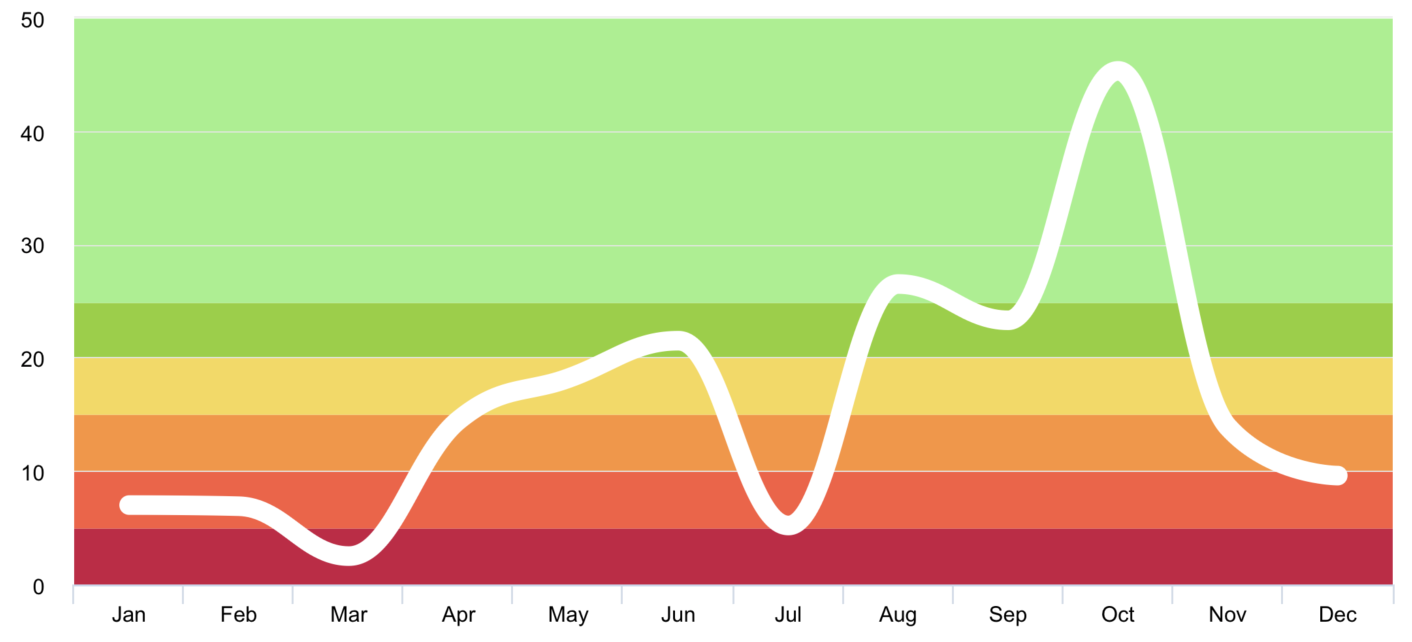
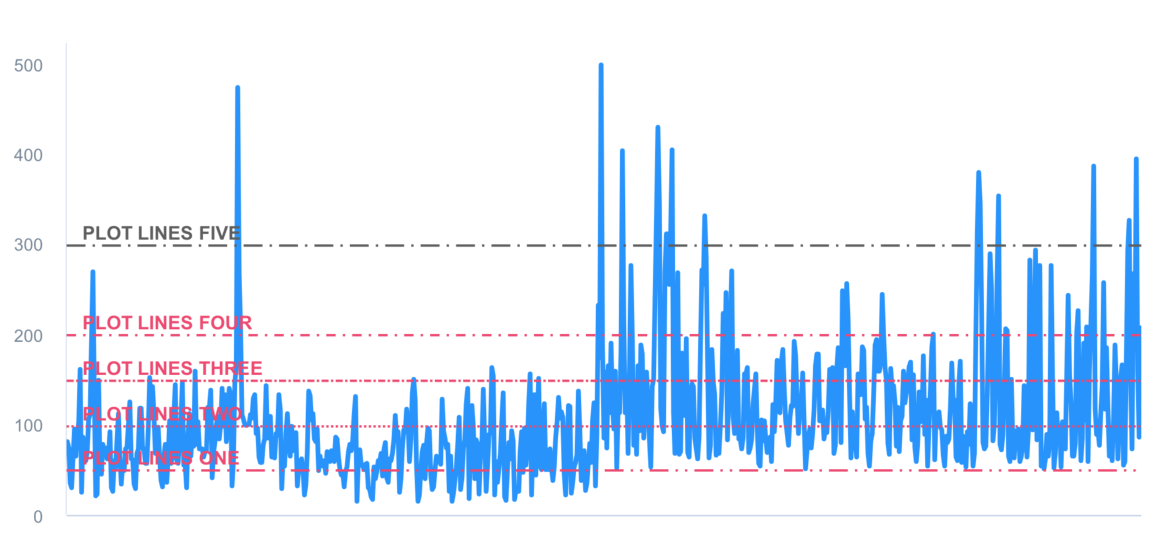
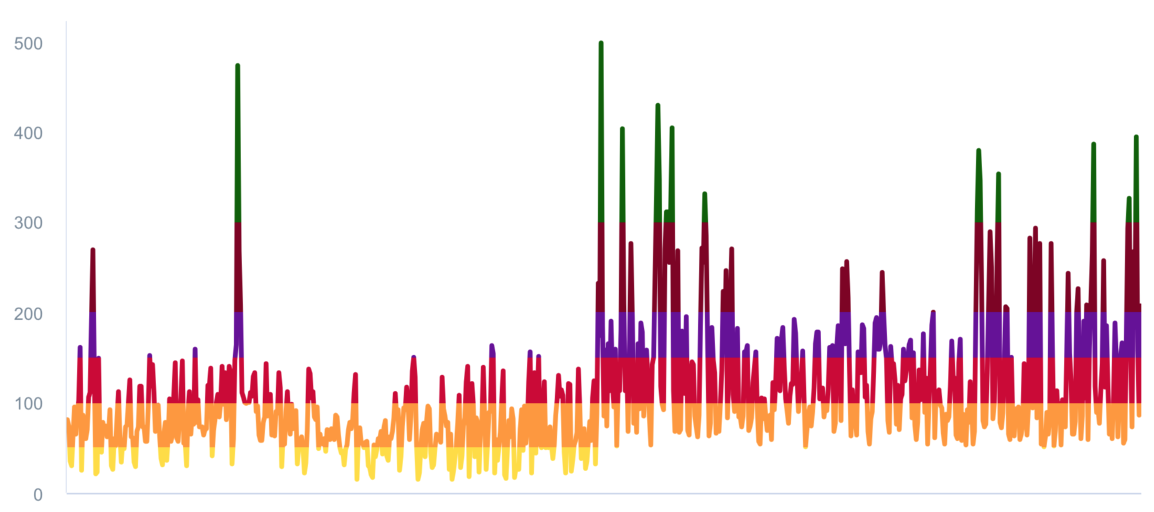
### 支持添加值域分割功能⚔
|
||
|
||
* 添加值域分割颜色带 `plotBands 🎀`
|
||
|
||
|
||
* 添加值域分割颜色线 `plotLines 🧶`
|
||
|
||
|
||
* 添加值域分割数据列分区 `zones 🧱`
|
||
|
||
|
||
### 支持图表数据的动态滚动刷新
|
||
|
||
<div align="center" >
|
||
<img src='https://raw.githubusercontent.com/AAChartModel/Gallery/master/AAChartKit/scrollingUpdateColumnChart.gif' >
|
||
<img src='https://raw.githubusercontent.com/AAChartModel/Gallery/master/AAChartKit/scrollingUpdateLineChart.gif' >
|
||
<img src='https://raw.githubusercontent.com/AAChartModel/Gallery/master/AAChartKit/scrollingUpdateStepAreaChart.gif' >
|
||
</div>
|
||
|
||
### 支持图表数据的动态排序
|
||
|
||
<div align="center" >
|
||
<img src='https://raw.githubusercontent.com/AAChartModel/Gallery/master/AAChartKit/DataSortingColumnChart.gif' >
|
||
<img src='https://raw.githubusercontent.com/AAChartModel/Gallery/master/AAChartKit/DataSortingScatterChart.gif' >
|
||
<img src='https://raw.githubusercontent.com/AAChartModel/Gallery/master/AAChartKit/DataSortingBarChart.gif' >
|
||
</div>
|
||
|
||
### 当前已支持的图表类型有十种以上,说明如下
|
||
|
||
```kotlin
|
||
enum class AAChartType(val value: String) {
|
||
Column ("column"),
|
||
Bar ("bar"),
|
||
Area ("area"),
|
||
Areaspline ("areaspline"),
|
||
Line ("line"),
|
||
Spline ("spline"),
|
||
Scatter ("scatter"),
|
||
Pie ("pie"),
|
||
Bubble ("bubble"),
|
||
Pyramid ("pyramid"),
|
||
Funnel ("funnel"),
|
||
Columnrange ("columnrange"),
|
||
Arearange ("arearange"),
|
||
Areasplinerange ("areasplinerange"),
|
||
Boxplot ("boxplot"),
|
||
Waterfall ("waterfall"),
|
||
Polygon ("polygon")
|
||
}
|
||
```
|
||
|
||
### 当前已支持的图表手势缩放类型共有三种,说明如下
|
||
|
||
```kotlin
|
||
enum class AAChartZoomType(val value: String) {
|
||
None ("none"), //禁用图表手势缩放功能(默认禁用手势缩放)
|
||
X ("x"), //支持图表 X 轴横向缩放
|
||
Y ("y"), //支持图表 Y 轴纵向缩放X
|
||
XY ("xy"), //支持图表 XY 轴纵向缩放
|
||
}
|
||
```
|
||
|
||
NOTE:例如,设置了`AAChartModel`的缩放属性`zoomType`为`AAChartZoomType.X`,并且将图表进行了手势放大之后,这时候如果想要左右滑动图表,可以使用 **双指点按** 屏幕中的`AAChartView`视图区域进行 **左右拖动** 即可.同时屏幕的右上角会自动出现一个标题为 **"恢复缩放"** 的按钮,点击恢复缩放,图表大小和位置将会回归到原初的样式. 默认为`AAChartZoomType.None`,即禁用缩放功能.
|
||
|
||
### 当前已支持的图表渲染动画类型有三十种以上,说明如下
|
||
|
||
```kotlin
|
||
enum class AAChartAnimationType(val value :String){
|
||
EaseInQuad ("easeInQuad"),
|
||
EaseOutQuad ("easeOutQuad"),
|
||
EaseInOutQuad ("easeInOutQuad"),
|
||
EaseInCubic ("easeInCubic"),
|
||
EaseOutCubic ("easeOutCubic"),
|
||
EaseInOutCubic ("easeInOutCubic"),
|
||
EaseInQuart ("easeInQuart"),
|
||
EaseOutQuart ("easeOutQuart"),
|
||
EaseInOutQuart ("easeInOutQuart"),
|
||
EaseInQuint ("easeInQuint"),
|
||
EaseOutQuint ("easeOutQuint"),
|
||
EaseInOutQuint ("easeInOutQuint"),
|
||
EaseInSine ("easeInSine"),
|
||
EaseOutSine ("easeOutSine"),
|
||
EaseInOutSine ("easeInOutSine"),
|
||
EaseInExpo ("easeInExpo"),
|
||
EaseOutExpo ("easeOutExpo"),
|
||
EaseInOutExpo ("easeInOutExpo"),
|
||
EaseInCirc ("easeInCirc"),
|
||
EaseOutCirc ("easeOutCirc"),
|
||
EaseInOutCirc ("easeInOutCirc"),
|
||
EaseOutBounce ("easeOutBounce"),
|
||
EaseInBack ("easeInBack"),
|
||
EaseOutBack ("easeOutBack"),
|
||
EaseInOutBack ("easeInOutBack"),
|
||
Elastic ("elastic"),
|
||
SwingFromTo ("swingFromTo"),
|
||
SwingFrom ("swingFrom"),
|
||
SwingTo ("swingTo"),
|
||
Bounce ("bounce"),
|
||
BouncePast ("bouncePast"),
|
||
EaseFromTo ("easeFromTo"),
|
||
EaseFrom ("easeFrom"),
|
||
EaseTo ("easeTo"),
|
||
}
|
||
```
|
||
|
||
以下是**AAInfographics**其中十种图表渲染动画类型
|
||
|
||
| Back | Bounce | Circ | Cubic | Elastic |
|
||
|:---------:|:---------:|:---------:|:---------:|:---------:|
|
||
| ![][1] | ![][2] | ![][3] | ![][4] | ![][5] |
|
||
|
||
|
||
| Expo | Quad | Quart | Quint | Sine |
|
||
|:---------:|:---------:|:---------:|:---------:|:---------:|
|
||
| ![][6] | ![][7] | ![][8] | ![][9] | ![][10] |
|
||
|
||
|
||
## 关于`AAChartModel` 属性说明
|
||
|
||
* ### AAChartModel 主要属性说明
|
||
|
||
属性名称 | 描述 | 取值范围 |
|
||
------------ |------------- | ------------- |
|
||
title | 图表主标题 | 任意有效的字符串 |
|
||
subtitle | 图表副标题 | 任意有效的字符串 |
|
||
chartType | 图表类型,可以为`AAChartType`枚举字符串当中指定的任意有效类型.其中有支持`柱状图` 、`条形图` 、`折线图` 、`曲线图` 、`折线填充图` 、`曲线填充图`、`雷达图`、`扇形图`、`气泡图`、`散点图`、`金字塔图`、`漏斗图`、`区域范围图`、`柱形范围图`等多种图形 | AAChartType.Column, <br/> AAChartType.Bar,<br/> AAChartType.Area, <br/> AAChartType.AreaSpline,<br/> AAChartType.Line,<br/> AAChartType.Spline,<br/> AAChartType.Pie,<br/> AAChartType.Bubble, <br/> AAChartType.Scatter,<br/> AAChartType.Pyramid, <br/> AAChartType.Funnel,<br/> AAChartType.Arearange, <br/> AAChartType.Columnrange |
|
||
stacking| 是否将图表每个数据列的值叠加在一起。 默认的值为`.none`, 即禁用堆叠样式效果.另有常规堆叠样式和百分比堆叠样式可供选择 | AAChartStackingType.None,<br/>AAChartStackingType.Normal,<br/> AAChartStackingType.Percent |
|
||
symbol | 图表曲线连接点的样式类型.其可供选择的值有`圆`、`正方形`、`钻石`、`常规三角形`和`倒三角形`,默认为混合样式 | AAChartSymbolType.Circle,<br/> AAChartSymbolType.Square,<br/> AAChartSymbolType.Diamond, <br/> AAChartSymbolType.Triangle,<br/> AAChartSymbolType.TriangleDown |
|
||
colorsTheme | 图表显示的颜色主题效果 |类似此 `arrayOf("#fe117c", "#ffc069", "#06caf4", "#7dffc0")` 有效十六进制颜色字符串数组 |
|
||
series | 图表的数据列 | AASeriesElement实例对象组成的有效数组,其中每个AASeriesElement都有与之对应的数据、类型、颜色、透明度等具体的值 |
|
||
|
||
|
||
|
||
更多详尽的图表属性设置参数您可以在 `AAChartModel` 和 `AAOptions` 文件中找到, 详细内容参见 `AAChartCore-Kotlin(AAInfographics)` 源代码.
|
||
|
||
|
||
|
||
|
||
## 作者
|
||
|
||
An An
|
||
```java
|
||
|
||
_oo0oo_
|
||
o8888888o
|
||
88" . "88
|
||
(| -_- |)
|
||
0\ = /0
|
||
___/`---'\___
|
||
.' \\| |// '.
|
||
/ \\||| : |||// \
|
||
/ _||||| -:- |||||- \
|
||
| | \\\ - /// | |
|
||
| \_| ''\---/'' |_/ |
|
||
\ .-\__ '-' ___/-. /
|
||
___'. .' /--.--\ `. .'___
|
||
."" '< `.___\_<|>_/___.' >' "".
|
||
| | : `- \`.;`\ _ /`;.`/ - ` : | |
|
||
\ \ `_. \_ __\ /__ _/ .-` / /
|
||
=====`-.____`.___ \_____/___.-`___.-'=====
|
||
`=---='
|
||
*******************************************************
|
||
¥¥¥¥¥¥¥¥¥¥¥¥¥¥¥¥¥¥¥¥¥¥¥¥¥¥¥¥¥¥¥¥¥¥¥¥¥¥¥¥¥¥¥
|
||
€€€€€€€€€€€€€€€€€€€€€€€€€€€€€€€€€€
|
||
$$$$$$$$$$$$$$$$$$$$$$$
|
||
BUDDHA_BLESS_YOU
|
||
AWAY_FROM
|
||
BUG
|
||
|
||
```
|
||
|
||
## 源代码⛓
|
||
语言版本 | 项目名称 | 适用平台| 源代码链接|
|
||
------------ | ------------- |------------- | ------------- |
|
||
Kotlin | AAInfographics | Android | https://github.com/AAChartModel/AAChartCore-Kotlin |
|
||
Java | AAChartCore | Android | https://github.com/AAChartModel/AAChartCore |
|
||
Swift | AAInfographics | iOS |https://github.com/AAChartModel/AAChartKit-Swift |
|
||
Objective C | AAChartKit | iOS | https://github.com/AAChartModel/AAChartKit |
|
||
|
||
|
||
## 许可证
|
||
|
||

|
||
|
||
本项目 `AAChartCore`使用 MIT许可证,详情请点击[MIT LICENSE](https://github.com/AAChartModel/AAChartKit-Swift/blob/master/LICENSE),框架所依赖的非框架原有的其他内容仍旧遵循其原有的许可证.
|
||
|
||
## 联系方式
|
||
|
||
-------------------------------------------------------------------------------
|
||
* 🌕 🌖 🌗 🌘 暖心提示 🌑 🌒 🌓 🌔
|
||
*
|
||
* 如果有任何使用上的问题,随时欢迎您在 GitHub 上向我提 issue.
|
||
* GitHub Issues : https://github.com/AAChartModel/AAChartCore/issues
|
||
-------------------------------------------------------------------------------
|
||
* 如果您想参与到此项目的开源活动中来,也同样随时欢迎您联系我
|
||
* GitHub : https://github.com/AAChartModel
|
||
* StackOverflow : https://stackoverflow.com/users/7842508/codeforu
|
||
* JianShu : http://www.jianshu.com/u/f1e6753d4254
|
||
* SegmentFault : https://segmentfault.com/u/huanghunbieguan
|
||
-------------------------------------------------------------------------------
|
||
|
||
## 待办清单
|
||
|
||
- [x] 支持图形加载完成后用户添加代理事件
|
||
- [x] 支持图形动态刷新全局内容
|
||
- [x] 支持图形动态刷新纯数据`(series)`内容
|
||
- [x] 支持色彩图层渐变效果
|
||
- [x] 支持横屏(全屏)效果
|
||
- [x] 支持自由设置图形渲染动画
|
||
- [x] 支持用户自由配置`AAOptions`模型对象属性
|
||
- [x] 支持图形堆叠
|
||
- [x] 支持图形坐标轴反转
|
||
- [x] 支持渲染散点图
|
||
- [x] 支持渲染柱形范围图
|
||
- [x] 支持渲染面积范围图
|
||
- [x] 支持渲染面积范围均线图
|
||
- [x] 支持渲染极地图
|
||
- [x] 支持渲染折线直方图
|
||
- [x] 支持渲染折线直方填充图
|
||
- [ ] 支持渲染矩形树状层级关系图
|
||
- [ ] 支持渲染活动刻度仪表图
|
||
- [ ] 支持为图形添加点击事件回调
|
||
- [ ] 支持图形实时刷新纯数据并动态滚动
|
||
- [ ] 支持已渲染图形生成图片文件
|
||
- [ ] 支持生成图片文件保存至系统相册
|
||
|
||
|
||
[1]: https://raw.githubusercontent.com/adad184/MMTweenAnimation/master/Images/1.gif
|
||
[2]: https://raw.githubusercontent.com/adad184/MMTweenAnimation/master/Images/2.gif
|
||
[3]: https://raw.githubusercontent.com/adad184/MMTweenAnimation/master/Images/3.gif
|
||
[4]: https://raw.githubusercontent.com/adad184/MMTweenAnimation/master/Images/4.gif
|
||
[5]: https://raw.githubusercontent.com/adad184/MMTweenAnimation/master/Images/5.gif
|
||
[6]: https://raw.githubusercontent.com/adad184/MMTweenAnimation/master/Images/6.gif
|
||
[7]: https://raw.githubusercontent.com/adad184/MMTweenAnimation/master/Images/7.gif
|
||
[8]: https://raw.githubusercontent.com/adad184/MMTweenAnimation/master/Images/8.gif
|
||
[9]: https://raw.githubusercontent.com/adad184/MMTweenAnimation/master/Images/9.gif
|
||
[10]: https://raw.githubusercontent.com/adad184/MMTweenAnimation/master/Images/10.gif
|
||
|