 coco
coco
183 lines
11 KiB
Markdown
183 lines
11 KiB
Markdown
# [](https://binjr.eu)
|
|
|
|
[](https://dev.azure.com/binjr/binjr/_build/latest?definitionId=1) [](https://github.com/binjr/binjr/releases/latest) [](https://search.maven.org/search?q=g:%22eu.binjr%22)
|
|
|
|
[](https://binjr.eu/trailer.html)
|
|
|
|
## Contents
|
|
* [What is binjr?](#what-is-binjr)
|
|
* [Features](#features)
|
|
* [Getting started](#getting-started)
|
|
* [Trying it out](#trying-it-out)
|
|
* [Getting help](#getting-help)
|
|
* [Contributing](#contributing)
|
|
* [How is it licensed?](#how-is-it-licensed)
|
|
|
|
## What is binjr?
|
|
|
|
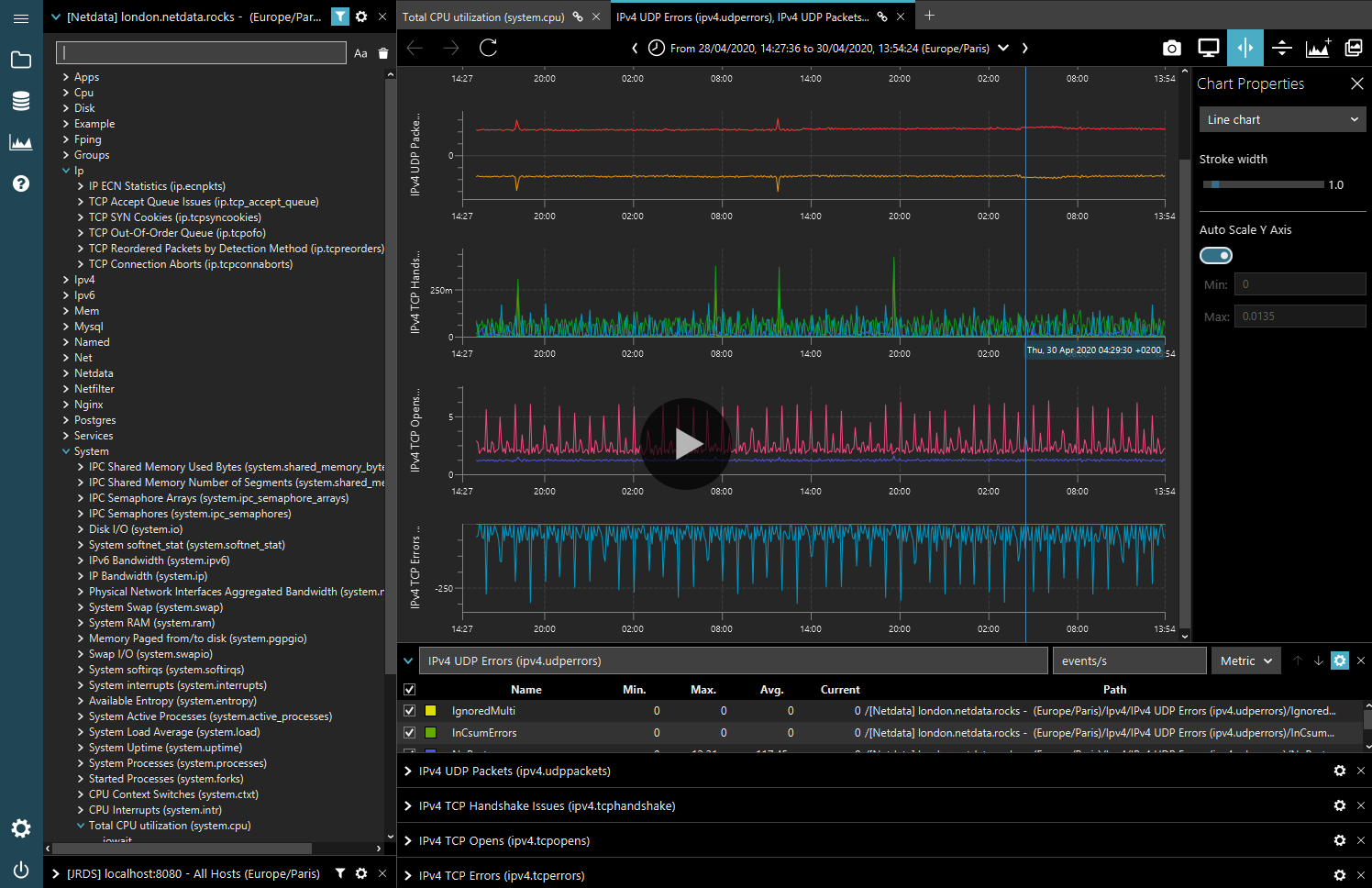
_binjr_ is a time series browser; it renders time series data produced by other applications as
|
|
dynamically editable representations and provides advanced features to navigate the data smoothly and efficiently
|
|
(drag & drop, zoom, history, detachable tabs, advanced time-range picker).
|
|
|
|
It is a standalone client application, that runs independently of the applications that produce the data; there are
|
|
no server or server-side components dedicated to _binjr_ that need to be installed on the source.
|
|
|
|
The user experience in _binjr_ revolves around enabling users to compose a custom view by using any of the time-series
|
|
exposed by the source, simply by dragging and dropping them on the view.
|
|
That view then constantly evolves as users add or remove series from different sources, while navigating through it by changing the time range,
|
|
the type of chart visualization and smaller aspects such as the color or transparency for each series.
|
|
Users can then save the current state of their session at any time to a file, in order to reopen it later or to share it with someone else.
|
|
|
|
_binjr_ also possesses the ability to visualize time series not only as charts of numeric values, but can be customized to
|
|
support visualization for any data type; for instance it features out-of-the-box a source adapter for text based log files.
|
|
|
|
Log files, produced by applications to trace their lifecycle at runtime, typically contain timestamps for each event
|
|
they contain; so we can think of them as time series, but with data points being textual information instead of numerical
|
|
values.
|
|
In practical terms, this means that a lot of the features built into binjr to compose and navigate time series
|
|
visualizations can be applied to log files with great benefits.
|
|
|
|
Behind the scene, _binjr_ uses Apache Lucene to index data from log files; meaning users can use its powerful query
|
|
language to hack through vast quantities logged events.
|
|
|
|
It also allows _binjr_ to open log files of any size; unlike most text editors which will fail to load multi
|
|
gigabytes-sized files as they try to fit it all in memory, _binjr_ will happily index those and present a paginated view so
|
|
that memory usage remains reasonable, while the backing index ensures navigating and searching is lightning fast.
|
|
|
|
|
|
With these abilities, _binjr_ aims to become the missing link between text editors and command line tools
|
|
traditionally used to analyse monitoring data locally and full-blown log analytics platforms (e.g. Elastic/Logstash/Kibana
|
|
stack) that centralizes logs for entire organizations.
|
|
It provides many of the same powerful visualization and search features while still remaining a totally
|
|
local solution (the data never needs to be pushed to the cloud - or anywhere else for that matter), and requiring no
|
|
setup nor maintenance to speak of.
|
|
|
|
|
|
### ...and what it isn't
|
|
* _binjr_ is **not** a system performance collector, nor a collector of anything else for that matter. What it provides is
|
|
efficient navigation and pretty presentation for time series collected elsewhere.
|
|
* _binjr_ is **not** a cloud solution. It's not even a server based solution; it's entirely a client application,
|
|
albeit one that can get its data from remote servers. Think of it as a browser, only just for time series.
|
|
* _binjr_ is **not** a live system monitoring dashboard. While you can use it to connect to live sources, its feature set is
|
|
not geared toward that particular task, and there are better tools for that out there. Instead, it aims to be an
|
|
investigation tool, for when you don't necessarily know what you're looking for beforehand and you'll want to build
|
|
and change the view of the data as you navigate through it rather than be constrained by pre-determined dashboards.
|
|
|
|
## Features
|
|
|
|
#### Data source agnostic
|
|
* Standalone, client-side application.
|
|
* Can connect to any number of sources, of different types, at the same time.
|
|
* Communicates though the APIs exposed by the source.
|
|
* Supports for data sources is extensible via plugins.
|
|
* Supports time-series with numeric (e.g. charts) or text (e.g. logs) values.
|
|
|
|
#### Designed for ad-hoc view composition
|
|
* Drag and drop series from any sources directly on the chart view.
|
|
* Mix series from different sources on the same view.
|
|
* Allows charts overlay: create charts with several Y axis and a shared time line.
|
|
* Highly customizable views; choose chart types, change series colours, transparency, legends, etc...
|
|
* Save you work session to a file at any time, to be reopened later or shared with someone else.
|
|
|
|
#### Smooth navigation
|
|
* Mouse driven zoom of both X and Y axis.
|
|
* Drag and drop composition.
|
|
* Browser-like, forward & backward navigation of zoom history.
|
|
* Advanced time-range selection widget.
|
|
* The tabs holding the chart views can be detached into separate windows.
|
|
* Charts from different tabs/windows can be synchronized to a common time line.
|
|
|
|
#### Fast, responsive & aesthetically pleasing visuals
|
|
* Built on top of [JavaFX](https://openjfx.io/) for a modern look and cross-platform, hardware accelerated graphics.
|
|
* Three different UI themes, to better integrate with host OS and fit user preferences.
|
|
|
|
#### Java based application
|
|
* Cross-platform: works great on Linux, macOS and Windows desktops!
|
|
* Strong performances, even under heavy load (dozens of charts with dozens of series and thousands of samples).
|
|
|
|
## Supported data sources
|
|
|
|
***binjr*** can consume time series data provided by the following data sources:
|
|
|
|
| Name | Description | Built-in[1] | Source type |
|
|
|-------------------------------------------------------------|--------------------------------------------------------------------------------------------------------------------------------|-------------|-------------|
|
|
| [JRDS](https://github.com/fbacchella/jrds) | A performance monitoring application written in Java. | ✓ | Remote |
|
|
| [Netdata](https://www.netdata.cloud) | Distributed, real-time performance and health monitoring for systems and applications. | ✓ | Remote |
|
|
| RRD Files | Round-Robin Database files produced by [RRDtool](https://oss.oetiker.ch/rrdtool/) and [RRD4J](https://github.com/rrd4j/rrd4j). | ✓ | Local files |
|
|
| CSV Files | Comma Separated Values files. | ✓ | Local files |
|
|
| Log Files | Text based, semi-structured log files. | ✓ | Local files |
|
|
| [JDK Flight Recoder](https://openjdk.org/jeps/328) | Low-overhead data collection framework for troubleshooting Java applications and the HotSpot JVM. | ✓ | Local files |
|
|
| [Demo Adapter](https://github.com/binjr/binjr-adapter-demo) | A plugin for binjr that provides data sources for demonstration purposes. | | Local files |
|
|
|
|
[1]: Support for data sources not marked as *'Built-in'* requires additional plugins.
|
|
|
|
## Getting started
|
|
|
|
There are several ways to get up and running with ***binjr***:
|
|
|
|
#### Download an application bundle
|
|
|
|
The simplest way to start using ***binjr*** is to download an application bundle from the [download page](https://binjr.eu/download/latest_release/).
|
|
|
|
These bundles contain all the dependencies required to run the app, including a copy of the Java runtime specially
|
|
crafted to only include the required components and save disk space.
|
|
They are only ~75 MiB in size and there is one for each of the supported platform: Windows, Linux and macOS.
|
|
|
|
Simply download the one for your system, unpack it and run `binjr` to start!
|
|
|
|
#### Build from source
|
|
|
|
You can also build or run the application from the source code using the included Gradle wrapper.
|
|
Simply clone the [repo from Github](https://github.com/binjr/binjr/) and run:
|
|
* `./gradlew build` to build the JAR for the all the modules.
|
|
* `./gradlew run` to build and start the application straight away.
|
|
* `./gradlew clean packageDistribution` to build an application bundle for the platform on which you ran the build.
|
|
> Please note that it is mandatory to run the `clean` task in between two executions of the `packageDistribution` in
|
|
> the same environment.
|
|
|
|
## Trying it out
|
|
|
|
If you'd like to experience binjr's visualization capabilities but do not have a compatible data source handy, you can use
|
|
the [demonstration data adapter](https://github.com/binjr/binjr-adapter-demo).
|
|
|
|
It is a plugin which embeds a small, stand-alone data source that you can readily browse using ***binjr***.
|
|
|
|
1. Make sure ***binjr*** is installed on your system and make a note of the folder it is installed in.
|
|
2. Download the `binjr-adapter-demo-1.x.x.zip` archive from https://github.com/binjr/binjr-adapter-demo/releases/latest
|
|
3. Copy the `binjr-adapter-demo-1.x.x.jar` file contained in the zip file into the `plugins` folder of your
|
|
***binjr*** installation.
|
|
4. Start ***binjr*** (or restart it if it was runnning when you copied the plugin) and open the `demo.bjr`
|
|
workspace contained in the zip (from the command menu, select `Workspaces > Open...`, or press Ctrl+O)
|
|
|
|
|
|
## Getting help
|
|
|
|
The documentation can be found [here](https://binjr.eu/documentation/getting-started/).
|
|
|
|
If you encounter an issue, or would like to suggest an enhancement or a new feature, you may do so [here](https://github.com/binjr/binjr/issues).
|
|
|
|
## How is it licensed?
|
|
|
|
***binjr*** is released under the [Apache License version 2.0](https://github.com/binjr/binjr/blob/master/LICENSE.md).
|
|
|
|
## Contributing
|
|
|
|
This project accepts contributions via [GitHub pull requests](https://github.com/binjr/binjr/pulls).
|
|
|
|
### Certificate of Origin
|
|
|
|
By contributing to this project you agree to the Developer Certificate of
|
|
Origin (DCO). This document was created by the Linux Kernel community and is a
|
|
simple statement that you, as a contributor, have the legal right to make the
|
|
contribution. See the [DCO](DCO) file for details.
|
|
|
|
|
|
|
|
|
|
|
|
|
|
|
|
|
|
|
|
|